- "image_url": "",
- "output_format": "png"
No effects available
AI Image Colorizer
Turn black-and-white and faded photos into natural, full-color images in seconds with one-click AI colorization.
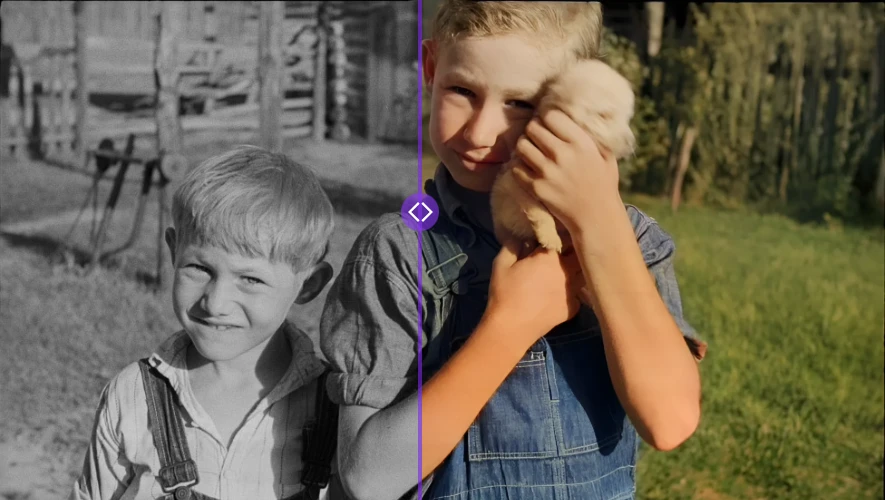
What is an AI image colorizer?
An AI image colorizer is an online tool that automatically adds realistic color to black-and-white, grayscale, or sepia photographs without any manual painting or masking. SharkFoto's colorizer analyzes the tones, textures, and objects in a photo and predicts contextually appropriate colors for skin, sky, foliage, clothing, and backgrounds, then renders a full-color version. It accepts JPEG, PNG, and WEBP images, processes most photos in about 5-20 seconds, adds no watermark, and the results are free to use commercially.
At a glance
Automatic, one-click colorization
No brushes, layers, or color picking. The AI does the analysis and applies color for you.
One-click colorization
Upload a black-and-white photo and get a fully colored result with no manual adjustments or masking required.
Context-aware colors
The AI recognizes subjects like skin, sky, grass, and clothing and applies colors that fit each region naturally.
Realistic, natural tones
Trained on a large and diverse set of images, the model favors believable, natural-looking color over oversaturated guesses.
Built for restoring real photos
Bring old family and historical photographs back to life while keeping the original detail intact.
Restore old memories
Add lifelike color to vintage family portraits, wedding photos, and archival images to make them feel present again.
Preserve original detail
Colorization is applied over your existing photo, so faces, edges, and fine detail from the source are preserved.
Instant results
Most images finish in seconds, so you can colorize a whole collection one photo at a time in a single sitting.
Flexible and private
Works with common image formats and keeps your files private.
Multiple formats
Upload JPEG, PNG, or WEBP files and download the colorized result as a PNG.
Preview before and after
Compare the original and colorized versions side by side before you download the final image.
Privacy protected
Uploads are sent over an encrypted connection, are never used to train AI models, and you can delete them from your account at any time; images are never shared with third parties.
How to colorize a photo with AI
Upload your photo
Drag and drop or select a black-and-white or faded photo in JPEG, PNG, or WEBP format.
Let the AI colorize
The AI analyzes the image and automatically applies realistic, context-appropriate colors. No adjustments needed.
Download and share
Preview the result and download your full-color image as a PNG to share, print, or use in projects.
What you can use the AI colorizer for
Restore family photos
Bring old family portraits and childhood pictures back to life with natural color for albums and keepsakes.
Historical and archival images
Add color to vintage and historical black-and-white photographs to make them more engaging and relatable.
Prints and gifts
Colorize a treasured old photo before printing it as a framed gift or memorial keepsake.
Education and storytelling
Make historical figures and events feel immediate for classrooms, presentations, and articles.
Content and social media
Colorize archival footage stills and vintage photos to create eye-catching before-and-after posts.
Genealogy and archives
Colorize scanned documents and photos across a family tree or collection, one photo at a time.
Frequently asked questions
How accurate is the colorization?
What image formats are supported?
How long does colorization take?
Is the AI image colorizer free?
Can I use the colorized images commercially?
Is my image data secure?
Do the results have a watermark?
Does it work on already-colored or faded photos?
Can I adjust the colors after colorizing?
Limitations to keep in mind
Colors are predicted, not recovered — The AI infers plausible colors from tone and context; it cannot know the true original color of a specific dress, car, or object, so exact historical accuracy is not guaranteed.
Best on clear source images — Heavily damaged, blurry, low-contrast, or poorly scanned photos produce weaker results. Cleaning or restoring the scan first improves colorization quality.
Ambiguous scenes can vary — Unusual materials, mixed lighting, or complex patterns may receive muted or slightly inconsistent color where the model has less certainty.
Related tools & models
Bring your black-and-white photos to life
Colorize old memories and historical images with natural, AI-generated color in seconds. No credit card required.