- "aspect_ratio": "16:9",
- "prompt": ,
- "quality": "medium",
- "resolution": "1k",
- "images": [],
- "output_format": "png",
- "image_output_num": 2
Faster results, great for most images. Switch to Sunburst when you need maximum detail.
No effects available
AI Image to Image Generator
Transform, enhance, and remix any existing photo with a text prompt, powered by AI models like GPT Image 2.0, Nano Banana 2, and Seedream 4.5, with output up to 4096×4096.
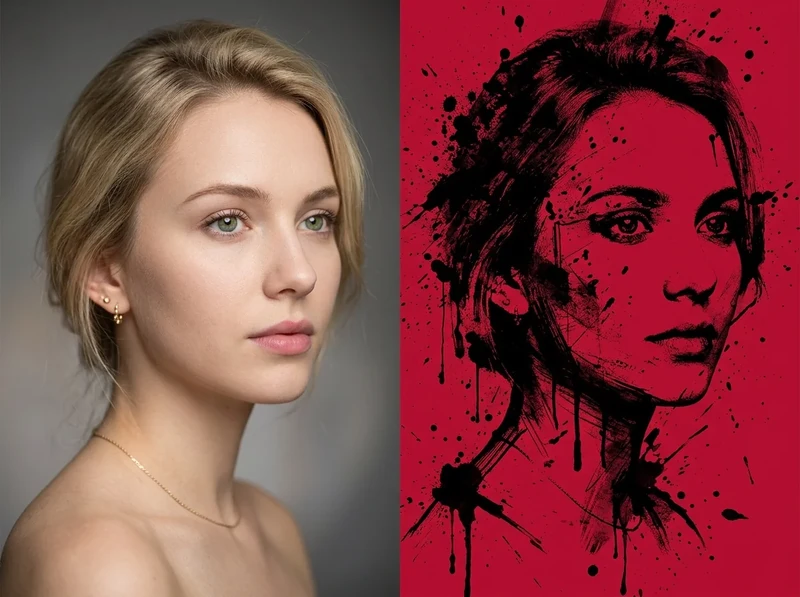
What is an AI image-to-image generator?
An AI image-to-image generator takes an existing image plus a text prompt and produces a new version that follows your instructions while preserving the parts of the original you want to keep. SharkFoto's tool uses diffusion and multimodal models — GPT Image 2.0, Nano Banana 2, Nano Banana Pro, Wan 2.7 Image, and Seedream 4.5 — to edit elements, change styles, swap backgrounds, restore or restyle photos, and re-render at higher resolution. It accepts common formats such as JPG, PNG, and WebP, supports eight aspect ratios, and exports up to 4096×4096 with no watermark and full commercial-use rights.
At a glance
Precise AI Editing
Change what you want and keep what you don't, guided by a text prompt.
Element Editing & Replacement
Add, remove, or swap specific objects, subjects, and details without redrawing the whole image.
Background Replacement
Replace or restyle the background while keeping the main subject intact.
Text Editing
Modify or clean up text baked into an image as part of the edit.
High-Fidelity Output
Export sharp, ready-to-use results at the size and shape you need.
4K Ultra-HD Output
Enhance and generate images from 1K up to 4096×4096 for print and large screens.
Multiple Aspect Ratios
Render in 1:1, 3:2, 2:3, 16:9, 9:16, 4:3, 3:4, or 21:9 to fit any placement.
Image Composition
Blend and rearrange elements to compose a new scene from your source.
Multi-Model Power
Pick the AI model that best fits the edit you're making.
Latest Model Lineup
Choose from GPT Image 2.0, Nano Banana 2, Nano Banana Pro, Wan 2.7 Image, and Seedream 4.5.
Style Transforms
Apply looks like photorealistic, cinematic, watercolor, anime, or illustration.
Fast Cloud Processing
Renders run on cloud GPUs so results come back in seconds, no local install needed.
How to transform an image with AI
Turn any photo into a new version in four steps.
Upload your image
Select the JPG, PNG, or WebP you want to enhance, remix, or transform.
Choose a model
Pick from GPT Image 2.0, Nano Banana 2, Nano Banana Pro, Wan 2.7 Image, or Seedream 4.5.
Enter your prompt
Describe what you want to modify, add, remove, or restyle in the image.
Set resolution & ratio
Choose an aspect ratio, upscale up to 4096×4096, and export instantly.
What you can do with image to image
Photo enhancement
Sharpen, upscale, and refine existing photos up to 4K Ultra-HD.
Object removal & replacement
Remove unwanted objects or swap them for something new via a prompt.
Background replacement
Change or restyle the background while keeping your subject in place.
Style transformation
Reimagine a photo as watercolor, cinematic, anime, or photorealistic art.
Portrait & face editing
Adjust portraits and touch up faces while preserving likeness.
Photo restoration
Repair and modernize old or damaged photos into clean, sharp images.
Compare image-to-image models
Each model brings different strengths to editing and remixing your photos. Pick the one that matches your task.
Strength. Strong prompt understanding and coherent edits with legible in-image text.
Best for. Complex, instruction-heavy edits and designs that include text.
Strength. Higher-fidelity output and finer control for demanding edits.
Best for. Detailed compositions and professional-grade results.
Strength. Fast, natural-looking edits that preserve the original subject well.
Best for. Everyday retouching, object swaps, and quick style changes.
Strength. Photorealistic edits with reliable prompt adherence and clean detail.
Best for. Realistic photo transformations and true-to-source edits.
Strength. Vivid, stylized transformations and creative reinterpretations.
Best for. Artistic restyles and bold visual makeovers.
Strength. Reliable, well-rounded edits with dependable prompt following.
Best for. General-purpose editing and everyday transformations.
Frequently asked questions
What is image to image?
Which AI models does the tool use?
What is the maximum resolution?
What input formats are supported?
Is it free to use?
Can I use the results commercially?
Do the images have a watermark?
What aspect ratios are available?
How is my uploaded image handled?
Can I combine multiple styles or edits?
Limitations to keep in mind
Edits are prompt-guided, not pixel-perfect — The AI interprets your prompt, so exact placement, fine text, and small details may need a few iterations to get right.
Complex changes may need re-runs — Heavy multi-part edits or unusual compositions can require rephrasing the prompt or switching models to get a clean result.
Source quality affects output — Very low-resolution, blurry, or heavily compressed inputs limit how much detail the model can recover or add.
Related tools & models
Transform your images with AI
Upload a photo, pick a model, and remix it into something new in seconds.