- "aspect_ratio": "$empty",
- "prompt": "Convert this photo into a black and white coloring page for printing. Pure white background, solid black outlines only, no grey, no shading, no hatching, no colour and no text. Keep the subjects recognisable and their pose and composition unchanged. Use thick bold even outlines and large simple shapes suitable for a young child, simplify the background to just a few big elements and leave generous empty areas to colour in.",
- "quality": "medium",
- "resolution": "1k",
- "images": [],
- "output_format": "png"
AI Coloring Page Generator
Turn photo into coloring page in seconds, free to try. Photo to coloring page means clean black outlines on a white background, ready to print and colour in.
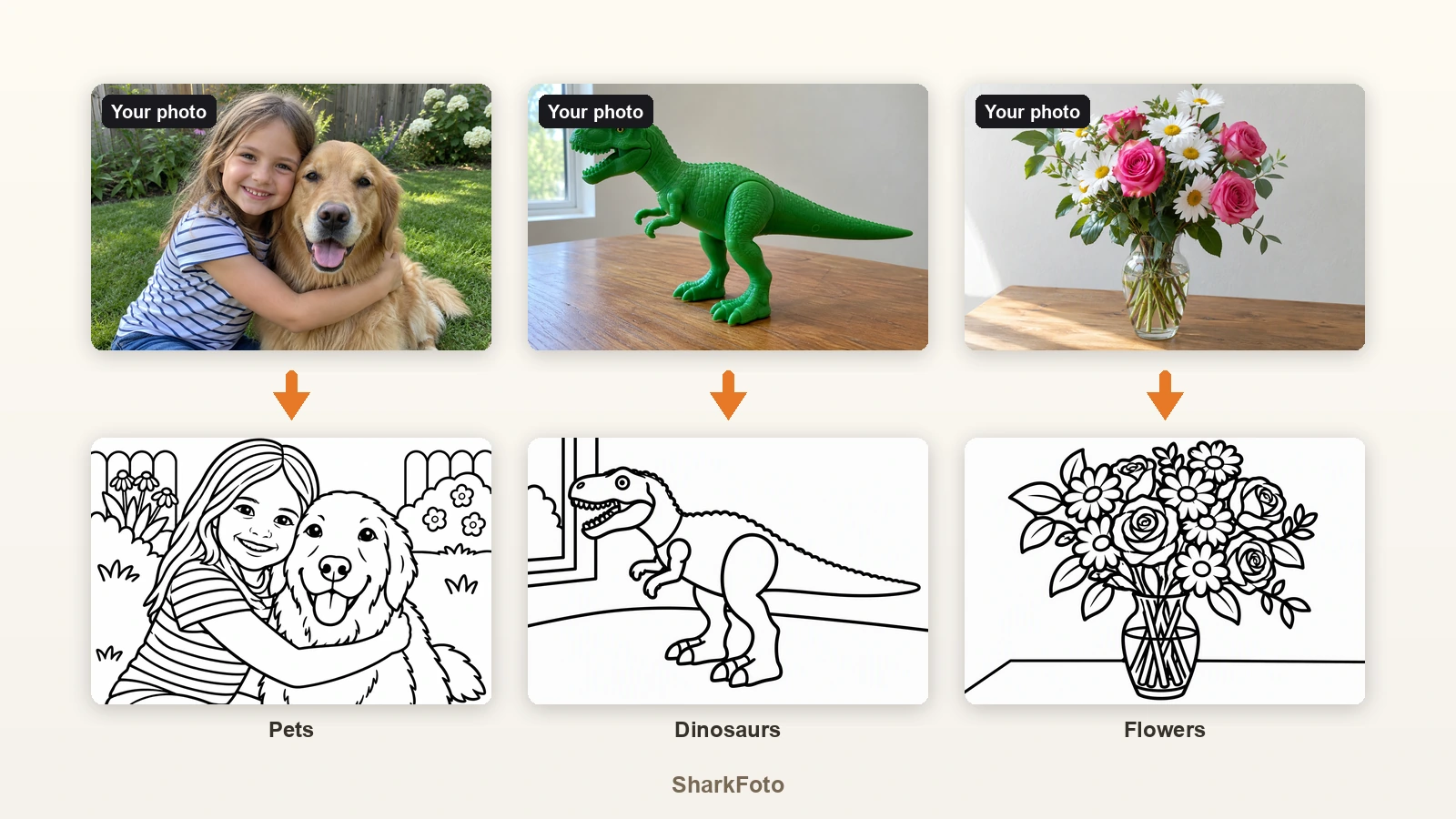
Coloring photos - turning a picture into line art you can fill in yourself - is what this tool does. A coloring page generator converts a photograph into line art: it keeps the shapes and composition of your picture and throws away colour, shading and texture, leaving black outlines on white paper that a child - or an adult - can colour in. Doing this by hand in an editor means tracing edges and cleaning up grey, which is why most people give up and print a generic sheet instead. Here you upload the photo, choose how thick the lines should be, and get a printable page of your own subject: your dog, your child's birthday, the dinosaur model they built, the flowers from the garden. Because it works from a photo, every sheet is personal rather than something a thousand other households printed the same week.
At a glance
Made for printing
Clean lines, white paper, no grey.
Outlines only
The output is solid black lines on a pure white background with no shading or hatching, so it prints cleanly on a home printer and does not drink ink.
1K or 2K output
1K is right for sharing on screen, 2K holds up when the page fills an A4 or Letter sheet.
Three line styles
Thick for children, fine for adults.
Kids, Standard and Detailed
Kids uses thick bold outlines and big open areas, Standard is the everyday middle ground, Detailed keeps fine texture for an adult colouring book.
Your subject stays recognisable
Faces, poses and composition are kept, so the page still looks like the photo you started from.
Anything you can photograph
People, pets, toys, places.
Personal pages, not stock sheets
A page of your own dog or your child's drawing beats another printable copy of the same generic picture.
Works on drawings too
Photograph a sketch or a toy and it becomes a clean colouring outline you can print again and again.
How to turn a photo into a coloring page
From a phone photo to a printable colouring sheet, in three steps.
Upload your photo
A JPG, PNG or WebP of anyone or anything - the kids, a pet, a dinosaur toy, a bunch of flowers, a favourite car.
Pick a line style
Kids for thick simple outlines, Standard for everyday colouring, or Detailed for an adult colouring book look.
Print and colour
Download the PNG and print it. Choose 2K if you want it to fill an A4 or Letter sheet crisply.
What people turn into coloring pages
Kids and family photos
Turn a birthday, a holiday or a school photo into a colouring sheet the children actually recognise.
Pets
A dog or cat photo becomes a pet coloring page - one of the most requested subjects and something no printable library has of your animal.
Dinosaurs, unicorns and toys
Photograph a dinosaur model, a unicorn toy or a favourite figure and print a colouring page of that exact thing.
Flowers and nature
Garden flowers, leaves and landscapes make calm, detailed sheets for adult colouring.
Cars and vehicles
A car, tractor or fire engine photo turns into bold outlines that younger children enjoy colouring.
Classroom and party activities
Make a set of sheets from photos of the group, the trip or the theme of the day, then print one per child.
Frequently asked questions
How do I turn a photo into a coloring page?
Is this coloring page generator free?
Can I make a coloring page from a pet photo?
Can I print the coloring pages?
Which style should I choose?
Does it work on drawings and toys?
Can I use the pages in a classroom or at a party?
Can it generate a coloring page from just a description?
What does coloring photos mean?
What resolution should I use for printing?
Good to know
Busy photos make busy pages — A cluttered scene becomes a lot of small shapes. A clear subject against a simple background gives the most colourable result, especially for young children.
Very dark or blurry photos struggle — The AI traces edges it can see. If the subject is in shadow or out of focus, the outlines come out vague - use the sharpest photo you have.
Faces become outlines, not portraits — Fine facial detail is simplified into lines. The person stays recognisable in Standard and Detailed, but Kids style deliberately reduces the face to simple shapes.
Related tools & models
Ready to make a coloring page?
Upload a photo, pick a line style and print your own colouring sheet. Free tier available, no design skills required.