- "aspect_ratio": "$empty",
- "prompt": "Redesign this room. Keep the architecture exactly as it is - the same walls, window and door positions, ceiling, floor plan and camera perspective must not move, and do not add or remove windows. Replace only the furniture, textiles, lighting and decor, and keep the result photorealistic with no text or watermark. Modern contemporary style: clean lines, a low neutral sofa or bed, matt lacquer and glass surfaces, a soft area rug, sculptural lighting, a restrained palette of greys, white and warm wood.",
- "resolution": "1k",
- "images": [],
- "output_format": "png"
AI Interior Design
Redesign any room from one photo, free to try. Pick a style and the AI restyles the furniture, textiles and lighting while your walls, windows and camera angle stay exactly where they are.
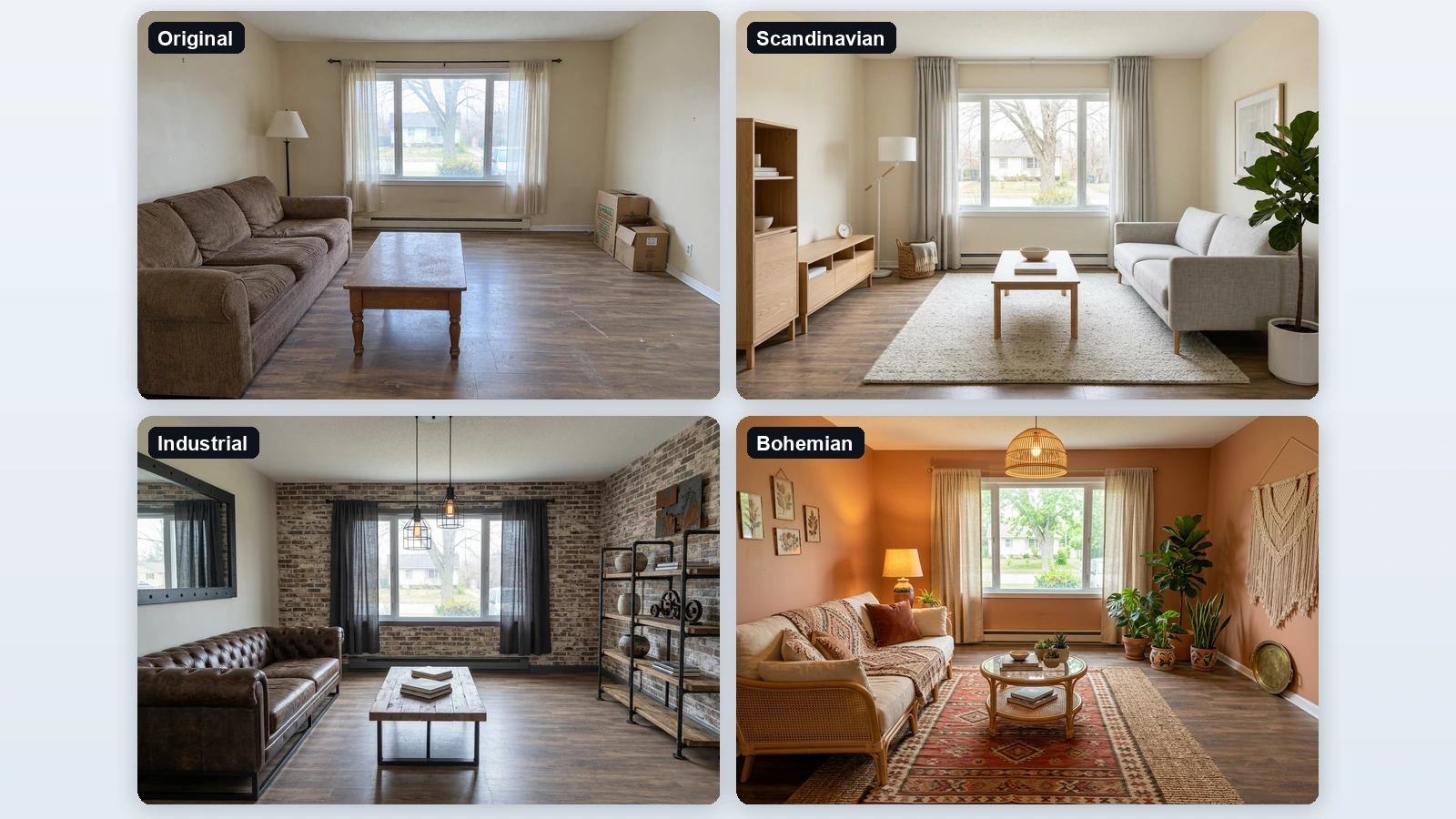
An AI interior design tool takes a photo of a real room and shows you what it could look like in a different style, without a designer, a mood board or a 3D model. The point is that it edits your room rather than generating a generic one: the walls, window and door positions, ceiling, floor plan and camera angle are held in place, and the furniture, textiles, lighting and decor are replaced around them. That makes the result usable as a decision - you can see whether a dark leather sofa suits the room before buying it, compare four styles for the same bedroom, or show a client what a rental could look like staged. Upload once, try a style, and run it again for the next one.
At a glance
Your room, restyled
It edits the photo, it does not invent a room.
The architecture stays put
Walls, window and door positions, ceiling height and the camera angle are preserved, so the result is comparable with the original shot.
Everything movable changes
Furniture, rugs, textiles, lighting, wall finishes and decor are replaced to match the style you picked.
Eight styles, no prompt writing
Pick from a list and run.
From Scandinavian to Industrial
Modern, Scandinavian, Japandi, Industrial, Bohemian, Modern Luxury, Minimalist and Coastal, each written as a full brief so you do not have to describe a look yourself.
Compare styles side by side
Run the same photo through several styles and put the results next to each other before you commit to anything.
Works on any room
Living room, bedroom, kitchen, office.
Furnished or empty
A cluttered lived-in room gets cleared and restyled; an empty room gets furnished, which makes it useful for staging a listing.
Keeps your framing
The output matches the aspect ratio of your photo and comes back at 1K or 2K, ready to drop into a deck or a listing.
How to redesign a room with AI
A styled room from a phone snapshot, in three steps.
Photograph the room
Stand in a corner or a doorway so the camera sees as much of the room as possible, and upload the JPG, PNG or WebP. An empty room works, a furnished one works too.
Pick an interior style
Modern, Scandinavian, Japandi, Industrial, Bohemian, Modern Luxury, Minimalist or Coastal. No prompt writing needed.
Download the new look
The room comes back restyled from the same viewpoint, so you can hold it next to the original and see exactly what would change.
What people use it for
Deciding before buying
See whether a style actually suits your room before spending money on furniture or paint.
Staging a listing
Show an empty or dated property furnished, so buyers and renters can picture living in it.
Client mood boards
Turn a site photo into several styled options for a client conversation, in minutes rather than days.
Renovation planning
Try different finishes and lighting on the room you actually have before briefing a contractor.
Rental refresh
Work out the cheapest set of changes that would modernise a rental without touching the layout.
Social and portfolio posts
Produce clean before and after pairs of real rooms for a portfolio or a social account.
Frequently asked questions
Is this AI room design tool free?
Does it keep my actual room?
Can it furnish an empty room?
Which rooms does it work on?
Can I try more than one style?
Do I have to write a prompt?
Can I use the images with a client or in a listing?
Will it change my walls or windows?
What resolution do I get?
Good to know
It is a visualisation, not a plan — Furniture is not measured against your room and the result is not a shopping list or a construction drawing. Treat it as a look you can then source and measure properly.
Shoot wide and level — A photo taken from a corner with the whole room visible gives the best result. Extreme angles, very dark rooms and shots of a single wall give the AI little to work with.
Small details can drift — Radiators, sockets and skirting are usually kept, but fine details may be redrawn. Run it again if something you care about changes.
Related tools & models
Want to see your room in a different style?
Upload one photo, pick a style and see the room restyled from the same angle. Free tier available, no designer and no credit card required.