- "aspect_ratio": "$empty",
- "prompt": "",
- "resolution": "1k",
- "images": [],
- "output_format": "png"
AI Object Remover
Remove object from photo in seconds: describe what should go and the AI erases it and rebuilds what was behind it. It works on people too, so you can remove people from photos that a stranger walked into.
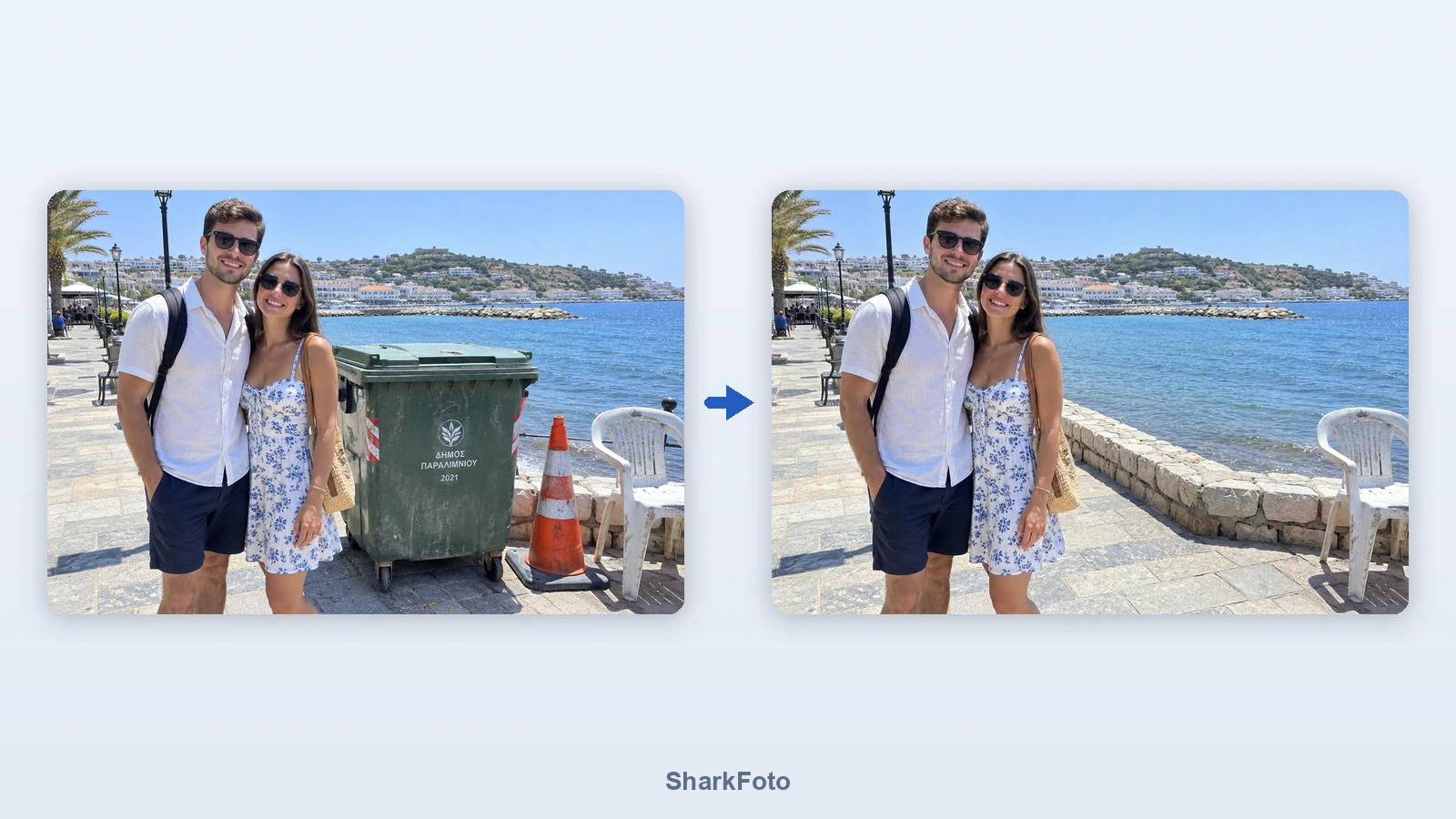
An object remover erases unwanted things from a picture and reconstructs the background behind them, so the result looks like the object was never there. Traditional tools make you paint a mask over the object and then patch the hole with a clone stamp, which takes practice and rarely survives close inspection on textured backgrounds. Here you describe what should disappear in ordinary language. The model finds it, removes it and rebuilds the scene - continuing the pavement, the wall, the shoreline or the sky - while keeping the people, colours and lighting in the rest of the frame exactly as they were. It works just as well on a single object as on a crowd of strangers in the background of a holiday photo.
At a glance
Describe it, do not mask it
Plain words instead of brushwork.
No brush, no lasso
You never have to trace an outline. Naming the object is enough, which also means it works on a phone as easily as on a desktop.
Several things at once
Remove a bin, a cone and a parked car in one pass by listing them in a single sentence.
The background is rebuilt, not smudged
What was hidden gets filled in.
Continues the real scene
Pavement keeps its pattern, a wall keeps its stones, the sea keeps its horizon - instead of the blurred patch a clone tool leaves behind.
Everything else stays put
Faces, clothing, colours and lighting in the rest of the photo are preserved, so the picture still looks like your photo.
Built for real photos
From phone snapshots to listings.
Keeps your framing
The output matches the aspect ratio of the photo you uploaded, so nothing gets cropped or stretched.
Up to 4K output
Choose 1K for a quick social post or 2K and 4K when the cleaned photo goes on a listing, a print or a product page.
How to remove an object from a photo
No brushes, no masking, no layers - just tell it what to erase.
Upload your photo
Drop in a JPG, PNG or WebP. Holiday shots, product photos, property listings - anything with something in it you wish was not there.
Say what to remove
Type it in plain words: 'remove the rubbish bin and the traffic cone', 'remove the people in the background', 'remove the car on the left'.
Download the clean photo
The AI fills the gap with what belongs there - pavement, sky, wall, water - and leaves the rest of your picture untouched.
What people remove
Strangers and photobombers
Clear tourists, passers-by and the person who wandered into the frame out of a holiday or wedding photo.
Street clutter
Rubbish bins, traffic cones, roadworks signs, parked cars and wheelie bins that spoil an otherwise good shot.
Property and rental listings
Tidy a room by removing clutter, cables, laundry racks or a car on the driveway before the photos go live.
Product photos
Take out props, price tags, stands and reflections so the product sits on a clean surface.
Power lines and poles
Erase overhead cables, lamp posts and aerials from landscape and architecture shots.
Old photos you want to reuse
Remove an ex-partner, a date stamp burned into the corner or a distraction you never noticed at the time.
Frequently asked questions
Is this object remover free?
Do I have to select the object with a brush?
Can I remove people from a photo?
Can I remove more than one thing at a time?
Will the rest of the photo change?
What resolution do I get back?
What if the wrong object disappears?
Does it work on screenshots and text?
Can I use the results commercially?
How do I remove a person from a photo?
Good to know
Be specific when the scene is busy — 'Remove the man in the red jacket' works better than 'remove the man' when there are several people. If the wrong thing disappears, rephrase and run it again.
Large objects are harder than small ones — Something covering most of the frame leaves a lot to invent, so the fill can look generic. Objects that cover part of a plain background give the cleanest results.
The photo is re-rendered — The whole image passes through the model, so fine texture can shift slightly even outside the area you cleaned. For documents, evidence or anything that must stay pixel-faithful, this is not the right tool.
Related tools & models
Got something in your photo that should not be there?
Upload the photo, say what to remove and download it clean. Free tier available, no masking and no credit card required.