- "image_url": "",
- "output_format": "png"
No effects available
AI Image Color Enhancer
Transform dull, flat photos into vibrant, balanced images with one-click AI color enhancement that boosts saturation, vibrancy, and contrast while preserving natural tones.
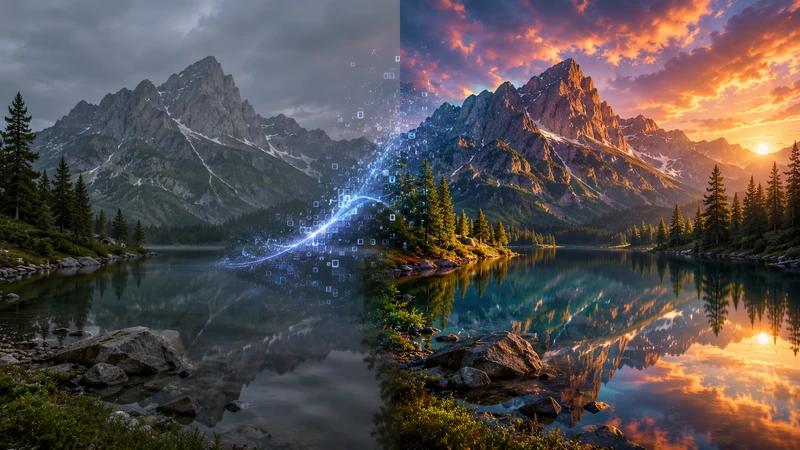
What is an AI image color enhancer?
An AI image color enhancer is an online tool that automatically analyzes a photo's color distribution and adjusts saturation, vibrancy, contrast, and white balance to make it look richer and more balanced. Unlike manual sliders in editing software, it applies these corrections in one click while preserving natural skin tones and avoiding oversaturation or color banding. SharkFoto's enhancer runs online with nothing to install, accepts JPEG, PNG, and WEBP files up to 50 MB, processes most images in 1-5 seconds, and outputs watermark-free results that are free for personal and commercial use.
At a glance
Why choose SharkFoto's color enhancer
Professional-grade color correction without expensive software or editing skills.
Automatic enhancement
One-click enhancement with intelligent AI that analyzes and optimizes each image's colors for you.
Natural colors
Preserves natural tones and skin colors while boosting vibrancy and saturation for believable results.
Lightning fast
Process your image in 1-5 seconds with an optimized AI engine built for instant results.
Multiple formats
Works with JPEG, PNG, and WEBP for maximum compatibility with your workflow.
Privacy protected
Images are transferred over an encrypted connection, are never used to train AI models, and you can delete them from your account at any time.
Professional quality
Achieve professional color correction without Photoshop, Lightroom, or manual editing.
Powerful enhancement controls
Everything the AI adjusts to bring your photo to life.
Smart saturation
Intelligently boosts color saturation without oversaturation or color banding artifacts.
Contrast enhancement
Lifts contrast to make details pop while keeping exposure balanced across highlights and shadows.
Vibrancy boost
Increases vibrancy to bring your image to life with richer, more dynamic color.
Color balance
Automatically corrects color temperature and white balance for natural-looking results.
Re-edit and refine
Fine-tune and re-run the enhancement on your uploaded image until the color looks right.
High-quality export
Export your enhanced image at full resolution with no quality loss or watermarks.
How to enhance photo colors with AI
Turn a flat, dull photo into a vibrant, balanced image in three steps, no account required.
Upload your image
Select or drag in a JPEG, PNG, or WEBP file up to 50 MB. No account required.
AI processing
The AI analyzes your image's color distribution and enhances saturation, vibrancy, contrast, and white balance automatically in seconds.
Download result
Preview and download your enhanced image at full quality, with no watermarks or usage limits.
What people use the color enhancer for
Product photography
Make e-commerce and marketplace product shots look brighter and more true-to-life to boost buyer confidence.
Real estate listings
Enhance interior and exterior photos so rooms look well-lit and inviting without a professional shoot.
Travel and landscape
Restore vibrant skies, water, and foliage in outdoor photos that came out flat or hazy.
Social media content
Give feed posts and stories a consistent, polished color pop before publishing.
Old or dull photos
Revive faded, low-contrast images with balanced color and renewed vibrancy.
Food and menu photos
Make dishes look fresher and more appetizing with richer, well-balanced colors.
Frequently asked questions
How does AI color enhancement work?
Is the color enhancer free to use?
Can I use enhanced images commercially?
Is my data secure and private?
What image formats are supported?
Can I enhance more than one image?
How long does enhancement take?
Will it change skin tones or make colors look fake?
Does enhancing reduce image quality?
Do I need to install any software?
Limitations to keep in mind
Enhancement, not restoration — The tool improves color, contrast, and vibrancy but cannot recover detail lost to heavy blur, extreme noise, or badly clipped highlights and shadows.
Automatic, not fully manual — Adjustments are applied automatically for speed and simplicity. If you need precise, per-region control over specific color channels, a full editor gives you finer control.
Format and size limits — Only JPEG, PNG, and WEBP files up to 50 MB are supported. Very large or unsupported formats need to be converted or resized first.
Related tools & models
Bring your photos to life with vibrant color
Enhance saturation, contrast, and vibrancy in seconds. No credit card, no watermarks, free for commercial use.