- "prompt": "Restore this damaged old photograph. Repair the scratches, creases, tears, stains, dust and mould spots, rebuild any missing corner, recover contrast and sharpness, and remove yellowing and fading. Keep the original colours - if the photo is black and white it stays black and white. Keep the people's faces, clothing, pose, the background and the composition exactly as they are - do not change who they are, do not restyle the scene and do not add anything that was not in the original. Photorealistic restoration of the original photograph, no text or watermark.",
- "aspect_ratio": "$empty",
- "resolution": "1k",
- "images": [],
- "output_format": "png"
AI Photo Restoration
Restore old photos online, free to try. Upload a scan or a phone snap of a damaged print and the AI repairs the scratches, creases and fading while keeping the people and the scene exactly as they were.
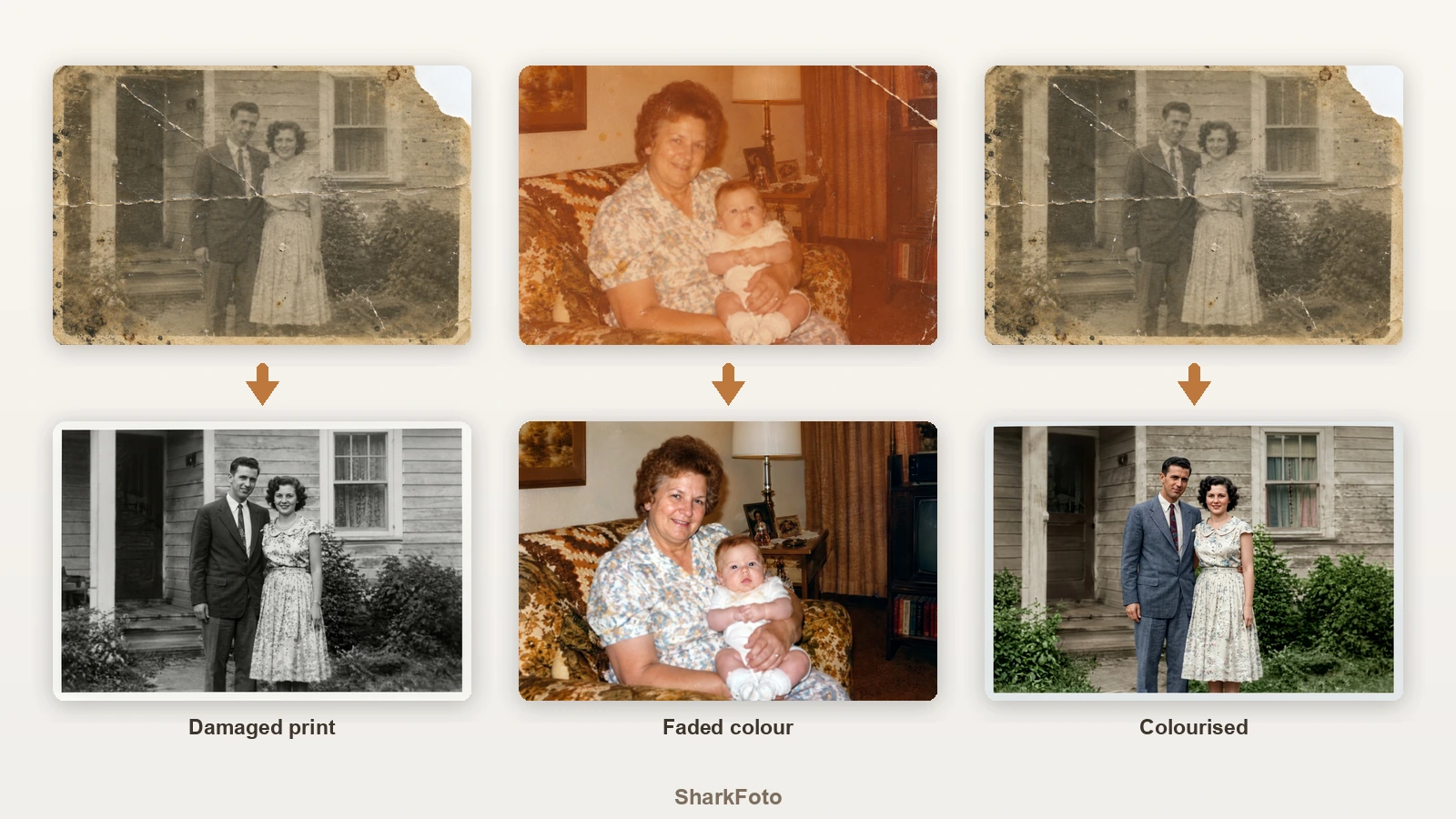
Photo restoration, also called image restoration, means repairing the physical damage a print has picked up over the decades - scratches, creases, tears, water stains, mould spots, dust and the yellow cast that comes with age - and recovering the contrast and detail that faded with it. Doing this by hand in Photoshop takes an experienced retoucher hours per image, which is why professional picture restoration costs what it does. The AI does the same job from one upload: it detects the damage, rebuilds what was underneath, including a missing corner, and returns the photo with the faces, clothing, pose and background unchanged. That last part matters more than anything else in restoration - the point is to recover the photograph you already have, not to generate a nicer looking one.
At a glance
Repairs the damage, keeps the people
Fidelity first.
Faces and scene preserved
Every mode is written to hold the faces, clothing, pose, background and composition of the original, so the restored copy is still the same photograph.
Rebuilds what was lost
Creases, tears, scratches, stains, mould spots and even a missing corner are filled in from the surrounding image.
Three ways to restore
Pick the result you want.
Restore or colourise
Keep the original black and white, or add natural period-accurate colour to an old monochrome print.
Gentle repair for purists
Remove the damage but keep the grain and soft tonality, so the photo still looks like a print from its decade rather than a modern digital shot.
Old colour photos too
Not just black and white.
Fixes colour shift and fading
Faded orange-shifted prints from the seventies and eighties are pulled back to natural tones, with the grain and stains cleaned up.
1K or 2K output
1K for sharing with the family, 2K when the restored photo is going to be printed or framed.
How to restore old photos
From a damaged print to a clean copy, in three steps.
Scan or photograph the print
A flatbed scan is best, but a straight-on phone photo in even light works. Upload the JPG, PNG or WebP.
Choose a restoration mode
Restore repairs the damage and keeps the original colours, Restore + colourise turns a black and white photo into colour, and Gentle repair fixes the damage but keeps the vintage look.
Download the restored photo
Get the cleaned image back at the same framing, at 1K or 2K, ready to print or share with the family.
What people restore
Family albums
Bring back wedding, baby and holiday photos that have creased and yellowed in an album for forty years.
Photos of relatives who have passed
Repair the one surviving portrait of a grandparent so it can be printed, framed or used at a memorial.
Water and fire damaged prints
Recover photos that were stained, spotted or partly destroyed after a flood, a leak or a house move.
Torn and creased prints
Rebuild a missing corner or a tear that runs across the middle of the only copy you have.
Faded colour snapshots
Correct the heavy orange cast and washed out colour of old drugstore prints from the seventies and eighties.
Archives and local history
Clean up scanned prints for a family tree, a club history or a community archive before publishing them.
Frequently asked questions
How do I restore old photos with this tool?
Is the photo restoration free?
Will it change what the people look like?
Can it repair a torn photo or a missing corner?
Can it colourise a black and white photo?
Does it work on faded colour photos?
What is Gentle repair for?
How should I scan the photo?
What resolution should I pick?
Good to know
Detail that is gone cannot be recovered exactly — Where a face is destroyed or a whole area is missing, the AI reconstructs something plausible rather than the truth. Check the result against any other copy you have before treating it as a record.
Scan quality sets the ceiling — A flat, evenly lit scan at a decent resolution gives a far better restoration than a phone photo taken at an angle with a shadow across the print.
Colourisation is an interpretation — Colours in the colourise mode are plausible for the period, not documented. If you know the real colour of a dress or a car, keep the original and colour it yourself.
Related tools & models
Got an old photo worth saving?
Upload one scan and see the damage disappear while the photograph stays itself. Free tier available, no retouching skills required.