- "color": "Keep the original hair color.",
- "aspect_ratio": "$empty",
- "style": "a short blunt bob cut that ends at the jawline, with a side part",
- "resolution": "1k",
- "images": [],
- "output_format": "jpeg"
AI Hairstyle Changer
Try on hairstyles with your own photo before you book the salon. Upload a selfie, pick a cut - bob, bangs, pixie, fade, quiff and more - choose a hair color if you like, and see a realistic preview of the new look in about a minute. Same face, new hair.
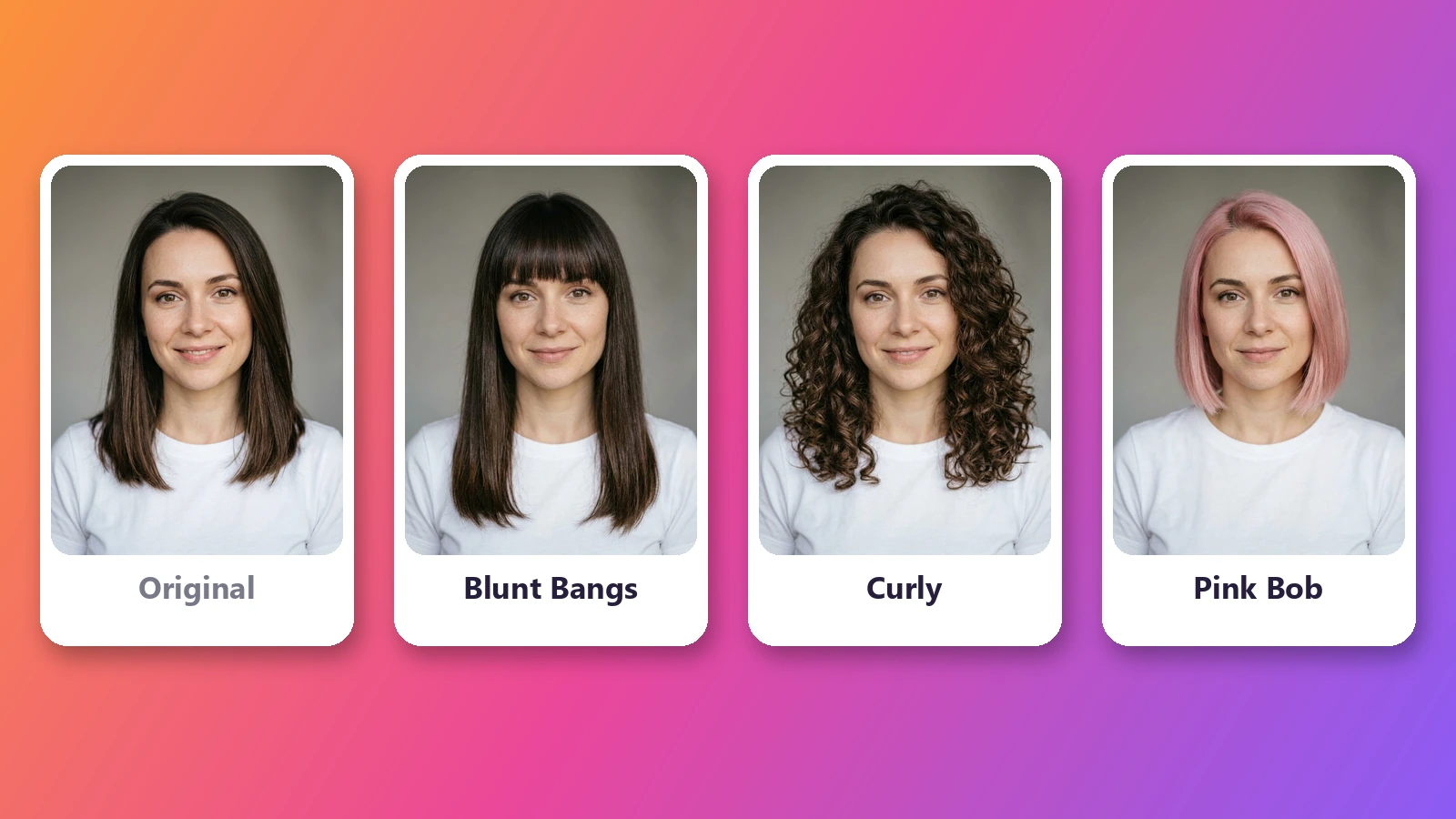
A new haircut is hard to undo, and holding a magazine photo next to your face only tells you so much. This AI hairstyle changer shows the cut on you. Upload one photo, tap a style, and the AI redraws only your hair - the length, the shape, the bangs, the fade - while your face, expression, clothes and background stay untouched, so the result looks like a photo of you taken after the appointment rather than a sticker pasted on top. It works as a virtual hairstyle try-on for the big decisions, like going from long hair to a bob or a pixie cut, getting bangs for the first time or growing out a buzz cut, and as a hair color changer when you are curious about blonde, copper red or silver gray. There is nothing to install: unlike a hairstyle app, it runs in the browser on your phone or computer. Try different hairstyles side by side, save the ones you like and take them to the salon so your stylist knows exactly what you mean.
At a glance
Still you, with new hair
Only the hair changes.
Same face
Your features, skin, eyebrows and expression are kept as they are - no beauty filter, no slimmer face, no bigger eyes.
Same photo
Clothes, pose, lighting and background stay put, so the new hairstyle is the only thing that is different.
22 cuts, one tap each
No prompt writing.
Women's styles
Bob, blunt bangs, curtain bangs, pixie cut, long layers, beach waves, curls, sleek straight, high ponytail, messy bun, box braids and shag.
Men's styles
Buzz cut, crew cut, fade, side part, slick back, quiff, textured crop, curly top, long wavy hair and man bun.
Hair color too
Cut and color in one go.
Ten colors or your own
Keep your natural color, or try black, dark brown, light brown, blonde, platinum, copper red, burgundy, silver gray, pastel pink or blue.
1K or 2K photos
1K is ideal for comparing looks on screen; 2K keeps more detail in the hair when you want to zoom in or print.
How to try on a hairstyle
From selfie to new haircut in three steps.
Upload your photo
A clear, front-facing photo works best - JPG, PNG or WebP. Your face, clothes and background stay exactly as they are.
Pick a hairstyle and color
Choose from 22 cuts for women and men, each with a preview. Keep your own hair color or try black, blonde, copper red, silver, pink and more.
See your new look
Get a realistic photo of yourself with the new hair. Try another cut or color until you find the one, then save it to show your stylist.
What people use it for
Before a big haircut
See yourself with a bob, a pixie cut or a buzz cut before committing to losing the length.
Should I get bangs?
Try curtain bangs or blunt bangs on your own face and settle the question without scissors.
Trying a hair color
Check how blonde, copper red, silver or a pastel shade suits your skin tone before buying dye or booking a colorist.
Men's haircuts
Compare a fade, a quiff, a side part and a crew cut on the same photo to decide what to ask the barber for.
Weddings and events
Preview a bun, a ponytail or loose waves with your face shape when planning a look for a big day.
Showing your stylist
Bring the picture to the salon - a photo of you with the cut is clearer than any description.
Frequently asked questions
How do I try on hairstyles with my own photo?
Is this AI hairstyle changer free?
Will it still look like me?
Can I change my hair color as well?
Does it have men's hairstyles?
Do I need to download a hairstyle app?
What kind of photo works best?
Can I try bangs without cutting my hair?
How accurate is the result compared with a real haircut?
Can I use a different hairstyle that is not in the list?
Good to know
It is a preview, not a promise — The result shows how a cut would look on you, but real hair has its own texture, thickness and growth pattern. Use it to choose a direction, then ask your stylist what will work.
Show your hair and face — Hats, hoods, heavy shadows or a face turned far to the side make the result less reliable. A clear, well lit, front-facing photo works best.
One person per photo — The tool is designed for a single person. Group photos give unpredictable results, so crop to yourself first.
Related tools & models
Curious how you would look?
Upload one photo and try on a new hairstyle in about a minute. Free to try, nothing to install.