- "aspect_ratio": "$empty",
- "prompt": "Redraw this photo as a clean black and white line drawing: confident ink contour lines of varying weight, only light hatching in the darkest areas, large areas left as clean white paper. Keep it unmistakably the same subject and scene. For any people or animals keep the identical face shape, eye shape and spacing, nose, mouth, jawline, hairline and apparent age - do NOT beautify, do NOT slim the face, do NOT enlarge the eyes, do NOT smooth wrinkles. Keep the identical pose, framing, proportions and every object in place. Pure white paper, no colour anywhere, no text, no signature, no border.",
- "resolution": "1k",
- "images": [],
- "output_format": "png"
AI Photo to Line Drawing
Turn a photo into a line drawing in seconds. Upload a portrait, a pet or a place and get back clean line art, a shaded pencil sketch or a minimal fine-liner drawing - the same face and the same scene, drawn by hand.
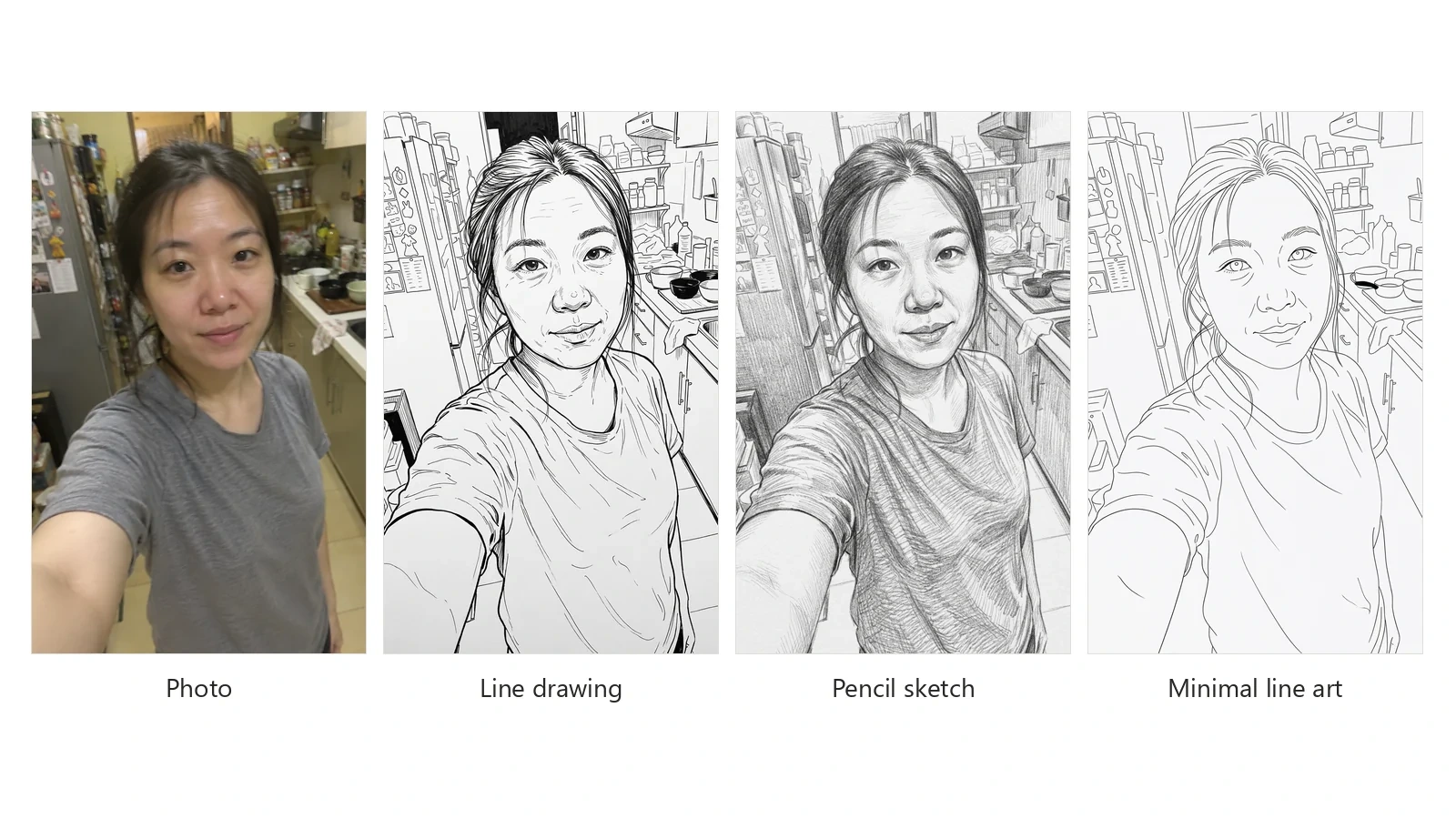
Turning a photo into a line drawing used to mean tracing it by hand over a lightbox, or fighting with edge-detection filters that produce broken, noisy outlines around every patch of texture. This AI photo to line drawing tool does what an illustrator would do instead: it decides which edges matter, redraws them as confident lines of varying weight, and leaves the rest as clean white paper. The result reads as line art drawn from your photo, not a filtered version of it. Three styles cover the common uses. Line drawing gives ink contour lines with a touch of hatching in the shadows. Pencil sketch turns the picture into a graphite study with cross-hatching and soft tonal shading, the classic photo to pencil sketch look. Minimal line art keeps only thin continuous outlines for tattoo references, laser engraving and minimalist wall prints. Whichever you choose, the drawing keeps the subject exactly as it is: the same face, the same expression, the same pose and every object in the background. It is not a beauty filter and it is not a new picture - it is your photo, drawn. The same image to sketch AI handles any kind of picture: turning a picture into a drawing for a gift, converting a photo to a line drawing for printing, or turning any picture into a pencil sketch for your wall.
At a glance
Your photo, drawn - not reimagined
Likeness comes first.
Same face, same age
Faces are redrawn with the same eye shape, nose, mouth and jawline. No slimming, no bigger eyes, no smoothed-out wrinkles.
Same scene
Pose, framing and every object in the background stay where they were, so a line sketch from a photo still reads as that photo.
Three drawing styles
Line art, pencil or minimal.
Line drawing and pencil sketch
Ink outlines with light hatching, or a graphite pencil sketch with cross-hatching and tone - switch between them on the same photo.
Minimal line art
Thin single-weight outlines with no shading at all, for tattoo stencils, engraving, embroidery and cutting machines.
Clean output you can use
Print, trace or cut.
Pure white paper
Black and grey lines on true white, with no colour cast, so the drawing prints cleanly and drops straight into a design.
1K or 2K
1K for sharing and profile pictures, 2K when the line drawing is going to be printed, framed or traced.
How to turn a photo into a line drawing
From photo to line art in three steps.
Upload your photo
JPG, PNG or WebP. Portraits, pets, houses, rooms and street scenes all work - a sharp, well lit photo gives the cleanest lines.
Pick a drawing style
Line drawing for ink outlines with light shading, Pencil sketch for graphite hatching and tone, or Minimal line art for thin single-weight outlines only.
Download the drawing
Get the line drawing back at the same framing on clean white paper, at 1K or 2K, ready to print, frame, trace or share.
What people turn into line drawings
Portraits and gifts
Turn a photo of a partner, a parent or a friend into a line drawing for a framed gift, a card or a wedding keepsake.
Pet portraits
Make a line drawing of a dog or cat from a favourite photo - the markings and expression stay recognisably theirs.
Houses and places
Turn a picture of a home, a venue or a street into a pencil sketch for housewarming gifts, invitations and estate listings.
Tattoo and engraving references
Use minimal line art as a starting point for a tattoo stencil, a laser engraving file or an embroidery pattern.
Profile pictures and avatars
A hand-drawn look for social profiles, blogs and author photos that still looks like you.
Drawing practice
Get a clean line drawing of any reference photo to trace, study proportions or practise shading on top of.
Frequently asked questions
How do I turn a photo into a line drawing?
Is this photo to line drawing tool free?
Will the drawing still look like the person in the photo?
Is this a photo to sketch AI or just a filter?
Can it turn a photo into a pencil sketch?
What is the difference between line art and a line drawing here?
How is this different from the AI Coloring Page Generator?
Does it work on pets, houses and landscapes?
Can I turn a sketch into a realistic image instead?
What resolution should I choose?
Good to know
Busy photos make busy drawings — Every object in the frame is drawn. For a cleaner portrait, crop the photo close to the subject or use one with a plain background before uploading.
Blur becomes guesswork — Lines follow the edges the AI can see. A dark, blurred or tiny photo gives softer, less certain lines - a sharp photo in even light gives the best line art.
It is a drawing, not a trace — Lines are redrawn rather than traced pixel by pixel, so they are cleaner than an edge filter but not a measured technical drawing.
Related tools & models
Got a photo you would like drawn?
Try photo to line drawing free with one picture and see it turned into line art in under a minute. No drawing skills required.