- "idea": ,
- "color": "Use that typical ink.",
- "size": "1:1",
- "style": "Fine line style: delicate thin single-weight lines, minimal shading, lots of negative space. Typical ink: black only.",
- "image_output_num": 2
No effects available
AI Tattoo Generator
Turn an idea into a tattoo design in seconds. Describe what you want - or type the words for a lettering tattoo - pick a style such as fine line, traditional, Japanese or script, and get clean artwork on a white background, ready to show your tattoo artist.
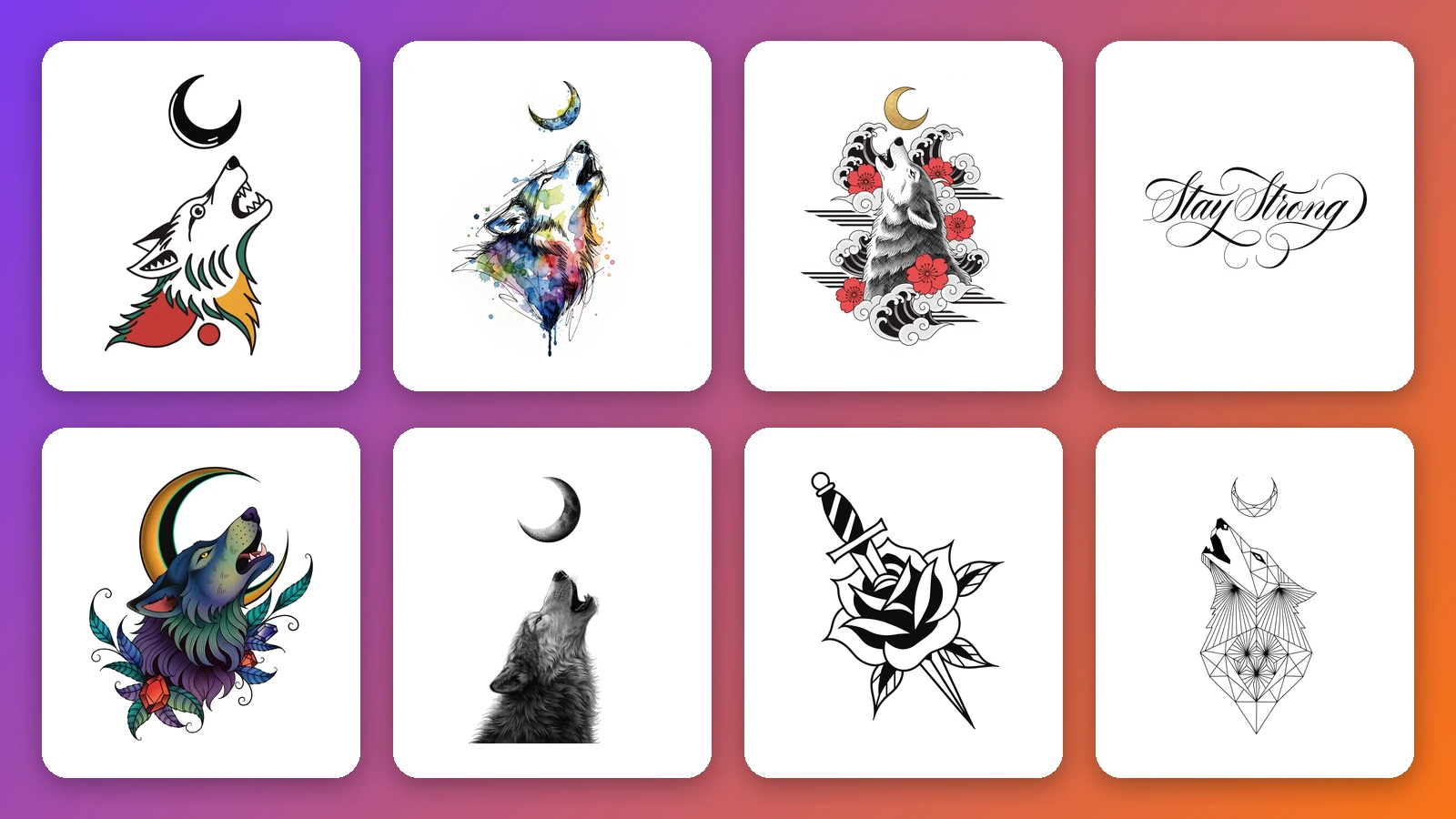
Most people walk into a tattoo studio with a feeling rather than a drawing: a wolf, something about family, a date that matters. This AI tattoo generator turns that feeling into something you can look at. Type the idea, choose a style, and it draws the design by itself on a plain white background - no arm, no skin, no mockup - the way flash sheets and stencils are drawn, so the artwork is easy to judge and easy to hand over. The style cards do the work a prompt usually has to do: fine line, minimalist, American traditional, neo-traditional, realism, blackwork, watercolor, Japanese, tribal, geometric, dotwork and sketch each produce a clearly different drawing of the same idea, which makes it a quick tattoo idea generator when you are still deciding on a direction. It is also a tattoo lettering generator: pick Script or Gothic lettering, type a name or a short phrase, and see it written in cursive or Old English blackletter instead of scrolling through tattoo fonts. Generate several versions, keep the ones you like and bring them to your artist as a starting point for the final piece.
At a glance
Styles that look like real tattoos
One tap instead of a long prompt.
12 artwork styles
Fine line, minimalist, traditional, neo-traditional, realism, blackwork, watercolor, Japanese, tribal, geometric, dotwork and sketch.
Each one different
The same idea comes out as a thin single-line drawing, a bold old-school flash piece or a soft watercolor - compare them side by side.
Lettering and name tattoos
Words drawn as a design.
Script lettering
Names, dates and short quotes in flowing cursive with flourishes - the classic look for name tattoos.
Gothic lettering
Old English blackletter with sharp ornamental details for bold word tattoos.
Ready for your artist
Clean artwork, not a mockup.
White background
The design is drawn alone on plain white, without skin or body parts, so it reads clearly and can be traced or printed.
Ink and shape options
Keep the style's usual ink or choose black and grey or full color, and pick a square, tall or wide layout to suit the placement.
How to design a tattoo with AI
From idea to tattoo design in three steps.
Describe your tattoo
Write the subject in plain words - a wolf howling at the moon, a rose with a dagger - or the name, date or quote you want as lettering.
Pick a style and ink
Choose one of 14 tattoo styles, each with a preview, then keep the style's usual ink or switch to black and grey or full color.
Generate and compare
Get up to four different designs at once. Change the style or wording until one feels right, then save it for your artist.
What people use it for
Finding a tattoo idea
See one idea in several styles before you decide what kind of tattoo you actually want.
Briefing your artist
Bring a picture instead of a description, so the consultation starts from something concrete.
Name and quote tattoos
Preview a name, a date or a few words in script or gothic lettering before choosing a tattoo font.
Matching and memorial tattoos
Explore small symbols for couples, friends and family, or a design that remembers someone.
Temporary tattoos
Print a design on temporary tattoo paper to wear it for a few days before committing.
Flash and references
Artists and illustrators use it to rough out flash ideas and reference sketches to redraw in their own hand.
Frequently asked questions
How do I make a tattoo design with AI?
Is this AI tattoo generator free?
Which tattoo styles can I choose?
Can it create name or lettering tattoos?
Is it a tattoo font generator?
Can I get a black and grey or a color version?
Can I take the design to a tattoo artist?
Can I use it for temporary tattoos?
Does it show the tattoo on my arm or body?
Will other people get the same design?
Good to know
A starting point, not a stencil — Skin, placement and size change what works as a tattoo. Treat the design as a reference and let your artist redraw and adapt it.
Check the spelling — Short names and phrases usually come out right, but always read lettering letter by letter before using it. Long sentences are less reliable - keep it to a few words.
Fine detail may not hold — Very small details and hairline strokes can blur on skin over time. Ask your artist how large the design needs to be.
Related tools & models
Have a tattoo idea?
Describe it, pick a style and see the design in seconds. Free to try, nothing to install.