- "idea": ,
- "size": "1024x1024",
- "style": "16-bit console game style: detailed sprites and background, rich but limited color palette, clean dark outlines.",
- "quality": "low",
- "output_format": "jpeg",
- "image_output_num": 1
Describe what you want and get it as pixel art.
AI Pixel Art Generator
Make pixel art from a description or turn a photo into pixel art. Choose a retro style - 16-bit, 8-bit, isometric, handheld green, cozy pastel or 1-bit - and get your picture in seconds.
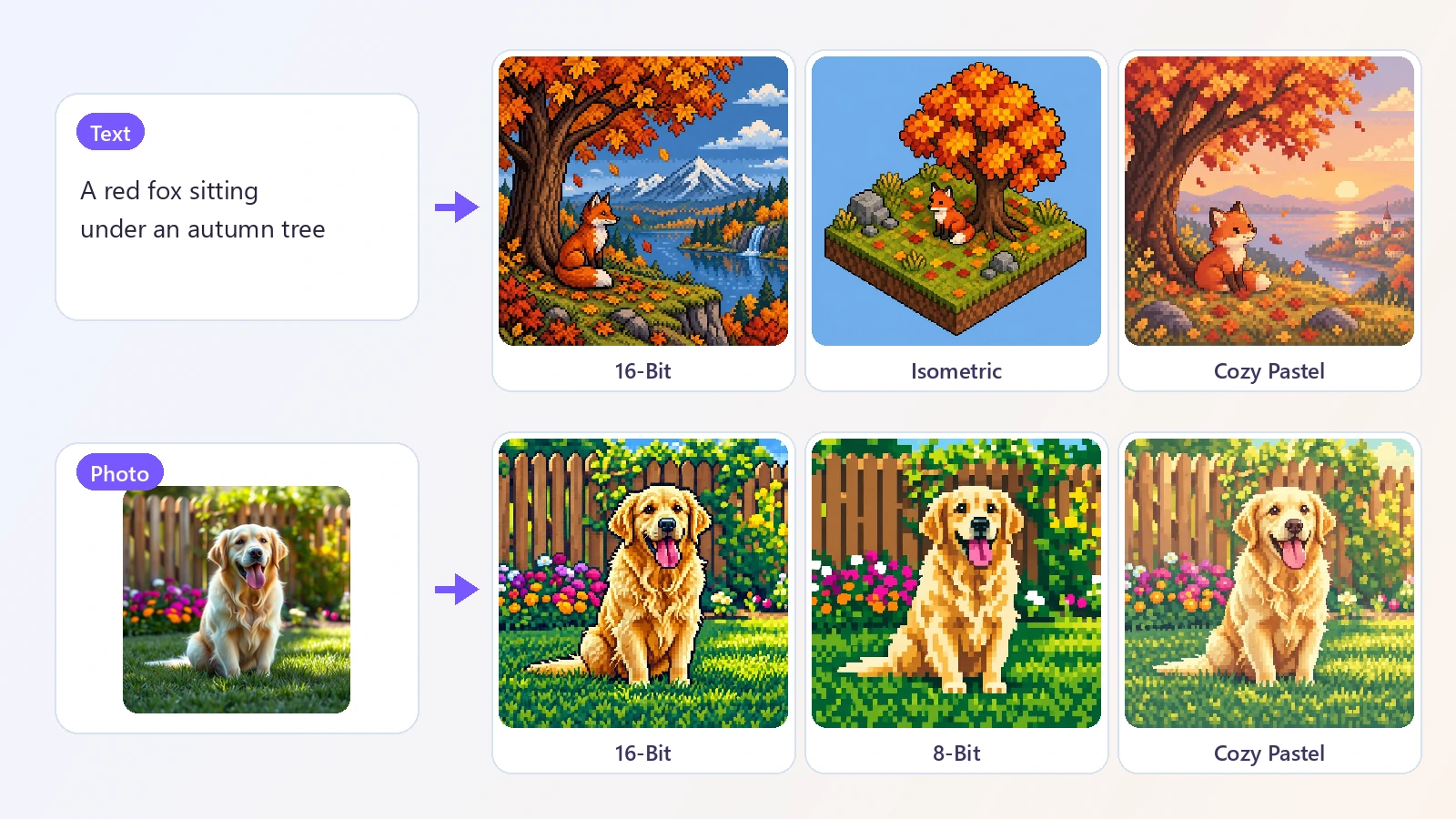
Pixel art is the look of classic video games: pictures built from visible square blocks of color, with hard edges and a small palette. Drawing it by hand means placing every pixel yourself. This AI pixel art generator gives you the same look in seconds, two ways. With Text, you describe a scene, a character or an object - a knight in front of a castle at sunset, a cozy ramen shop on a rainy night, a dragon curled around a treasure chest - and the AI draws it as pixel art. With Photo, you upload a picture and the AI converts it, keeping the subject, the pose, the composition and the main colors, so a photo of your dog becomes your dog as a retro game sprite. Six styles cover the main flavors of the genre: detailed 16-bit, chunky 8-bit, isometric dioramas, the four-shade green of old handheld consoles, soft cozy pastels and stark black-and-white 1-bit. People use it for game concept art and mood boards, profile pictures, stream overlays, posters, stickers and gifts. It works in the browser on a phone or a computer, and there is nothing to install.
At a glance
Text or photo
Two tools in one.
Text to pixel art
Describe a scene, a character or an item and get it drawn in pixels. Generate up to four versions at once.
Photo to pixel art
Convert a photo while keeping the subject, the pose and the composition. The result has the shape of your photo.
Six retro styles
Pick the era you like.
From 8-bit to isometric
16-Bit, 8-Bit, Isometric, Handheld Green, Cozy Pastel and 1-Bit, each with its own palette and level of detail.
See it before you pick
Every style card shows the same sample scene so the differences are easy to compare.
Fast and simple
No pixel-by-pixel work.
Ready in seconds
A picture takes about 10 to 15 seconds.
No drawing skills needed
A sentence or a photo is enough to start.
How to make pixel art
Two ways in, one click out.
Start from text or a photo
Pick Text to describe what you want, or Photo to upload a picture you want to convert.
Choose a pixel style
16-Bit, 8-Bit, Isometric, Handheld Green, Cozy Pastel or 1-Bit. Each card shows what the style looks like.
Generate and download
Your pixel art is ready in about 15 seconds. Download it as a JPG.
What people use it for
Game concepts
Sketch characters, items and scenes for a game idea or a pitch.
Profile pictures
Turn a selfie or a pet photo into a pixel avatar.
Streams and channels
Make retro panels, banners and emote ideas.
Posters and wallpapers
Create pixel scenes for a wall, a desktop or a phone.
Gifts and cards
Give someone a pixel version of a favorite photo.
Stickers and merch
Design pixel artwork for stickers, shirts and pins.
Frequently asked questions
How do I make pixel art with AI?
Is this pixel art generator free?
Can I turn a photo into pixel art?
What pixel art styles are there?
Can I make a pixel art character or avatar?
Can I use the result in a game?
Does it make transparent sprites?
What size is the image?
Can it make animated pixel art?
Can I use the pictures commercially?
Good to know
A pixel-art look, not a sprite file — The picture is drawn in pixel-art style at about 1024 px. It is not a tiny sprite on an exact grid, so it may need cleanup before it goes into a game engine.
No transparent background — Images are saved as JPG with a background. Use the Image Background Remover if you need a cut-out.
Photos are redrawn — In Photo mode the AI redraws the picture as pixel art, so small details and faces are simplified.
Each run is different — Generating again gives a new version. Use the same description and style for the closest match.
Related tools & models
Make something in pixels
Describe an idea or upload a photo and get pixel art in seconds.