Image Effects
AI Mount Rushmore Generator

AI Mount Rushmore Generator

0/1
Click to upload or drag and drop
JPG, JPEG, PNG, WEBP
Public Visibility

Nothing to see here... yet!

Ready to make something amazing? Give it a try.

AI Image Effect

AI Mount Rushmore
Generator

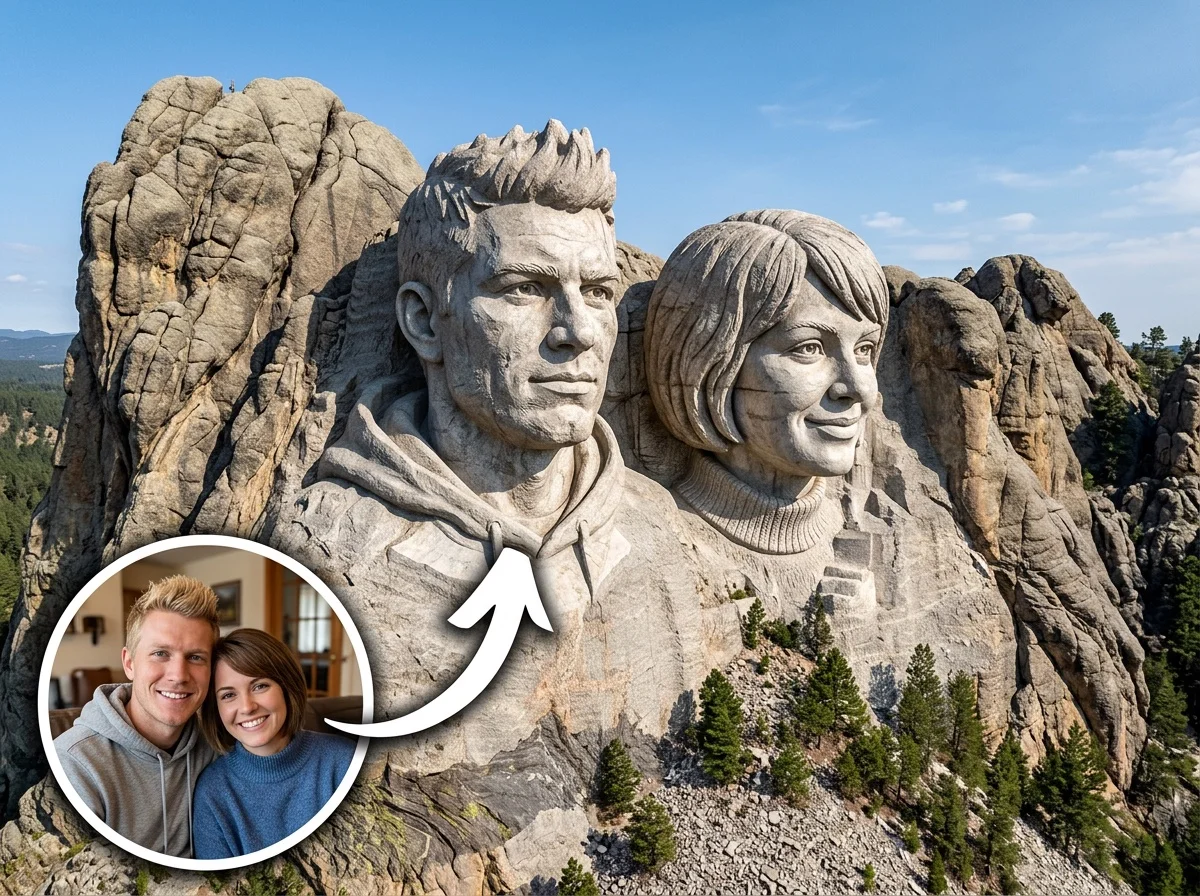
Carve your legacy into stone. Transform any portrait or group photo into a monumental, photorealistic granite sculpture in the awe-inspiring style of Mount Rushmore, complete with unified, solemn expressions.

AI Mount Rushmore Generator Effect preview
About This Effect

What Is the Mount Rushmore Generator?

This powerful Style Shift effect takes the subjects from your everyday photos and 100% automatically carves their likenesses into a massive, photorealistic granite mountainside, dominating a clear, expansive sky.

Monumental Stone Texture

Your subjects are rendered in a rough-hewn, photorealistic granite texture. Deep crevices and rock formations seamlessly blend facial features and clothing details directly into the mountain itself.

Unified Solemn Poses

Regardless of how people are standing or looking in your original photo, the AI automatically standardizes everyone into a forward-facing arrangement with serious, historical expressions.

Perfect Likeness Capture

While transforming the style, the AI meticulously retains the unique facial structures and upper-body clothing details of each subject, ensuring they are instantly recognizable in stone.

Dramatic Natural Daylight

The entire scene is bathed in bright, natural daylight against a clear sky. This lighting creates strong, realistic contrasts of light and shadow, giving the sculpture immense depth and scale.

How It Works

Carve Your Mountain in 3 Steps

01

Upload Your Photo

Upload a portrait or a group photo. SharkFoto AI automatically detects all main subjects in the image, no matter their original poses.

02

Apply the Effect

Select the AI Mount Rushmore Generator. The AI takes full control—standardizing poses, adjusting expressions, and texturizing the stone automatically.

03

Download & Share

Your epic monument is rendered in seconds. Download your high-resolution image and share your historical masterpiece with the world.

Features

Why Creators Love This Effect

100% Automated

No complex settings. The AI automatically aligns poses, applies solemn expressions, and generates the stone texture instantly.

Group Photo Support

Works brilliantly with multiple subjects. Transform your entire friend group or family into a cohesive, historic monument.

High-Resolution Output

Delivers crisp, detailed images perfect for sharing on social media, using as wallpapers, or even printing as gifts.

Lightning Fast Generation

SharkFoto's cloud AI pipeline renders your massive stone monument in seconds, so you can create and share instantly.

No Watermark on Download

Download your finished image watermark-free and ready to publish across all your social platforms.

Epic Style Shift

Transforms ordinary pictures into awe-inspiring, historical-style artwork that demands attention and drives engagement.

Use Cases

Who Uses the Mount Rushmore Generator?

Whether for a laugh, a tribute, or a viral post, this effect turns everyday faces into legendary stone figures.

👨�👩�👧�👦

Family & Friends

Turn your favorite group shots into an epic or hilarious historical monument honoring your friend group or family.

�

Team Building

Celebrate your startup founders, work team, or project members by putting them on their very own Mount Rushmore.

🤣

Meme Creators

Create highly engaging, viral-worthy content by carving unexpected subjects into a solemn, realistic stone mountain.

�

Unique Gifts

Print and frame a personalized, monumental portrait as a funny and unforgettable gift for loved ones or colleagues.

FAQ

Frequently Asked Questions

What kind of photo works best?

Photos with clear, unobstructed faces work best. The AI can perfectly handle both single portraits and group photos, making it highly versatile.

Can I manually adjust the poses or facial expressions?

No manual adjustments are needed or possible! The AI is designed to be fully automatic. It standardizes everyone into a unified, solemn, forward-facing pose to perfectly match the authentic Mount Rushmore style.

Do I need to crop the background out first?

Not at all. The AI automatically detects the main subjects and extracts them from your original background before carving them into the mountain and adding the expansive sky.

Is this a video or an image effect?

The AI Mount Rushmore Generator is an Image Effect (Style Shift category) that outputs a stunning, high-resolution static picture.

How long does it take to generate?

Just a few seconds. Our cloud-based AI processes the image, carves the stone, and delivers your monumental masterpiece almost instantly.

Carve Your Legacy Today.

Join thousands of creators on SharkFoto and turn any photo into an epic visual experience — no skills needed, completely automatic.

Start Creating for Free

No credit card required · Free plan available · Instant access