- "aspect_ratio": "4:3",
- "image_input": [],
- "output_format": "jpeg"
Giant Fashion Item
No effects available
What Is the Giant Fashion Item Effect?
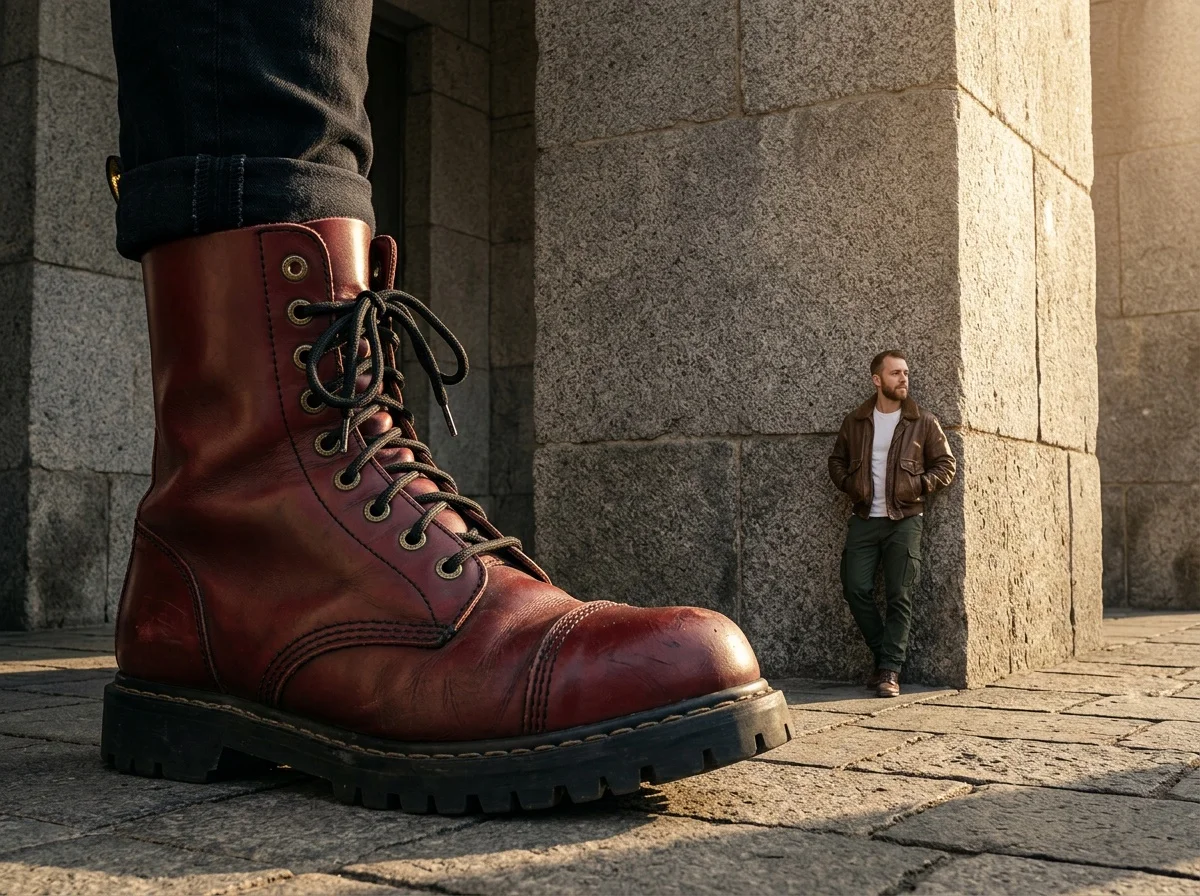
The Giant Fashion Item Effect uses advanced AI to place your subject in a surreal, high-fashion urban environment. It creates a striking visual contrast by pairing a massive, intricately detailed fashion accessory in the foreground with a miniature version of your subject in the background.
Surreal Scale & Perspective
Play with proportions like never before. The AI masterfully manipulates depth of field and scale, making everyday fashion items look colossal while shrinking your subject to a miniature size, creating an eye-catching surrealist composition.
Massive Fashion Elements
A giant sneaker, a colossal handbag, or an enormous piece of apparel—the effect generates a highly detailed fashion item that commands the foreground. Every stitch, fabric texture, and material detail is rendered with stunning realism.
Urban Street Aesthetic
The scene is set in a gritty yet stylish city street bathed in natural light. A rough, gray stone or concrete wall provides the perfect textured backdrop for your miniaturized subject to lean against, enhancing the street-style vibe.
Photorealistic Lighting & Textures
From the woven fabric of the giant accessory to the coarse concrete of the street, the AI generates high-resolution textures and realistic lighting. The interplay of shadows and natural light grounds the surreal concept in reality.
Create Your Surreal Fashion Image in 3 Steps
Upload Your Photo
Upload any portrait or full-body photo. SharkFoto AI automatically detects your subject and prepares it for the creative transformation.
Select Giant Fashion Item
Choose the "Giant Fashion Item" effect from the gallery. The AI completely automates the process, intelligently designing the scene and proportions without any manual adjustments needed.
Download & Share
Within seconds, your surreal masterpiece is ready. Download your high-resolution image and share your unique, perspective-bending artwork with the world.
Why Creators Love This Effect
Photorealistic AI Rendering
Cinematic-quality output with realistic lighting, shadows, and high-definition textures that make the surreal scene fully believable.
Completely Automated Process
No complex settings. The AI automatically generates the perfect giant fashion item and scene layout based solely on your uploaded photo.
Fast Generation — Seconds, Not Hours
SharkFoto's cloud AI pipeline renders your complex surreal image in seconds, so you can create, iterate, and post without waiting.
No Watermark on Download
Download your finished image watermark-free and ready to publish across all your social media platforms or portfolios.
Works on Any Portrait Photo
Upload a selfie, a professional headshot, or a full-body photo — the AI seamlessly adapts your subject into the miniature background.
Trending Visual Concept
Tap into the popular surrealist and high-fashion editorial aesthetic that consistently drives engagement and stops the scroll.
Who Uses the Giant Fashion Item Effect?
From digital artists to fashion lovers, this effect is built for anyone who wants to make an unforgettable visual statement online.
Fashion Enthusiasts
Create avant-garde, editorial-style fashion imagery that stands out from typical street-style photos.
Creative Artists
Generate unique visual references or stunning digital art pieces playing with scale, proportion, and surrealism.
Social Media Creators
Stop the scroll on Instagram and Pinterest with visually striking, mind-bending compositions.
Brand Marketers
Craft eye-catching, creative promotional materials that highlight fashion aesthetics in a bold, unforgettable way.
Frequently Asked Questions
What type of photo works best?
Full-body or half-body photos with a clear subject work best. The AI will extract your subject and seamlessly integrate them into the miniature background setting.
Can I choose the specific giant fashion item?
No, the process is entirely automated to ensure the best artistic result. The AI intelligently selects and generates a highly detailed fashion item (like a shoe, bag, or hat) that perfectly fits the composition and lighting of the scene.
Can I use this effect commercially?
Yes. All images generated on SharkFoto are yours to use commercially, including for brand campaigns, sponsored content, and promotional materials. Please review the SharkFoto Terms of Use for full details.
Do I need any photo editing skills?
None at all. Simply upload your photo, select the Giant Fashion Item effect, and SharkFoto handles everything — from subject extraction to surreal compositing and lighting — automatically.
Where can I access the Giant Fashion Item effect?
You can access it directly on SharkFoto.com. Sign up for a free account to get started — no software download or installation required.