- "aspect_ratio": "4:3",
- "image_input": [],
- "output_format": "jpeg"
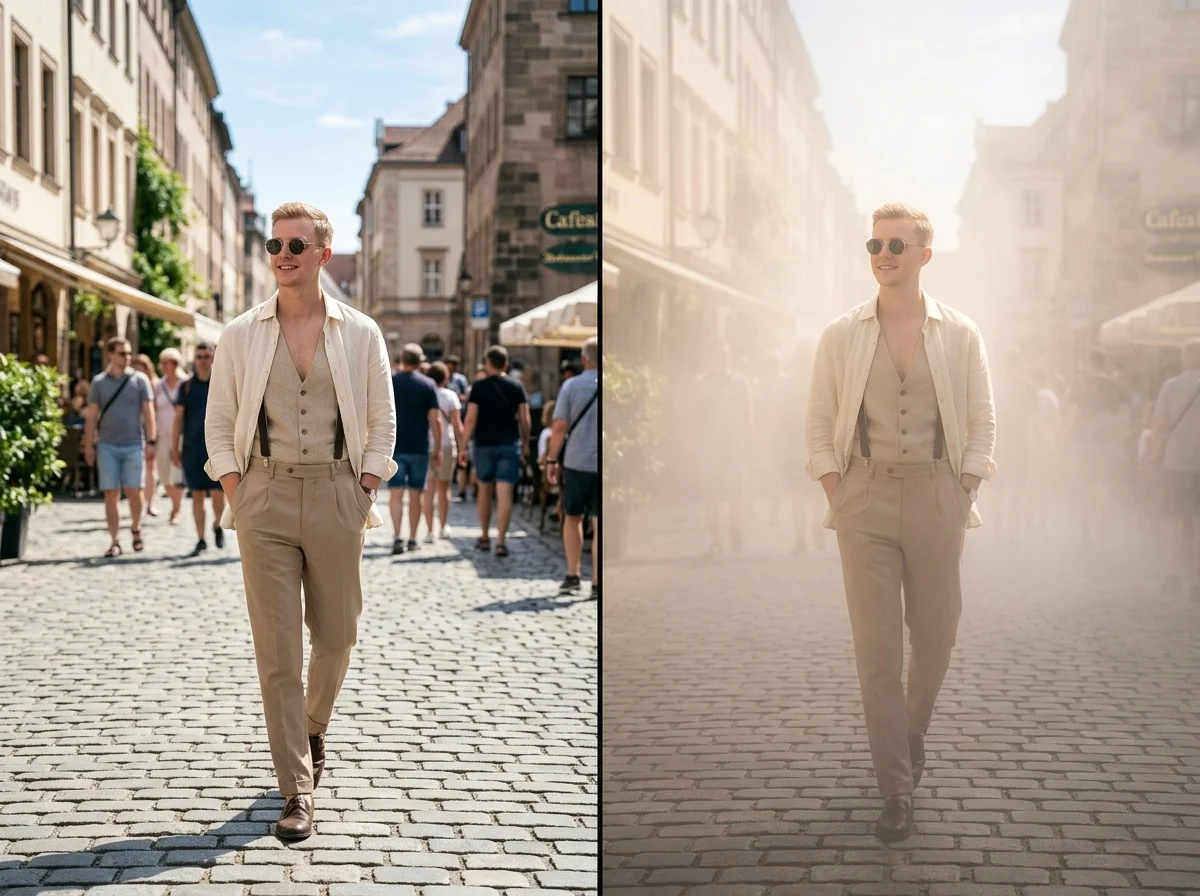
Fog Glow
No effects available
What Is the Fog Glow Effect?
The Fog Glow Image Effect acts as an intelligent atmospheric filter. It seamlessly introduces gentle light scattering and visible light beams into your original photo, instantly elevating its mood to a cinematic masterpiece without altering the core image.
Cinematic Haze & Mist
Adds a natural, soft mist that diffuses light beautifully across your scene. The AI generates a moody and atmospheric vibe that breathes life and mystery into any ordinary environment.
Volumetric Tyndall Effect
Generates stunning volumetric lighting where visible beams of light naturally pass through the fog. It perfectly simulates the Tyndall effect, complete with subtle highlights and soft glowing edges.
Smooth Depth Falloff
The AI intelligently maps the 3D depth of your 2D image. It applies fog and light scattering naturally, making background elements fade smoothly while keeping foreground subjects crisp.
Zero Composition Changes
Your original colors, poses, subjects, and key details remain 100% untouched. The AI acts strictly as a professional environmental filter, preserving the authenticity of your photo.
Add Cinematic Fog in 3 Steps
Upload Your Photo
Upload any landscape, portrait, or street photo. SharkFoto AI immediately analyzes the lighting and depth structure of your image.
Apply Fog Glow
Select the Fog Glow effect. The process is fully automated—the AI calculates the perfect light scattering and fog density instantly, with no manual tweaking required.
Download & Share
Your atmospheric masterpiece is ready in seconds. Download the enhanced, high-resolution image and share your moody visual with the world.
Why Creators Love This Effect
Photorealistic Volumetric Light
Generates accurate light beams and scattering that perfectly match your photo's existing light sources.
Preserves Original Details
Modifies only the atmosphere. Your subjects, faces, and background structures remain exactly as they were.
One-Click Automation
Fully automated AI processing means you get professional-grade visual effects without tweaking complex sliders.
Fast Generation
SharkFoto's cloud AI pipeline renders stunning atmospheric lighting in seconds, so you can create and iterate instantly.
No Watermark on Download
Download your finished image watermark-free and ready to use in your projects or social media feeds.
Vibe Capture Category
Perfectly suited for capturing mood. Instantly turns flat, ordinary lighting into an immersive visual experience.
Who Uses the Fog Glow Effect?
Whether you want to add drama to a forest trail or cinematic lighting to a portrait, Fog Glow elevates your imagery effortlessly.
Photographers
Enhance landscape or street photography with dramatic atmospheric effects and professional lighting without waiting for the perfect weather.
Social Media Creators
Give your feed a cohesive, cinematic, and moody aesthetic that instantly grabs attention and stops scrollers in their tracks.
Digital Artists
Quickly add depth, soft glowing edges, and atmospheric perspective to your digital compositions or renders in one click.
Everyday Magic
Turn an ordinary snapshot from a walk in the woods or a city night into a breathtaking, poster-worthy image effortlessly.
Frequently Asked Questions
What type of photo works best?
Photos with clear light sources—like sunlight filtering through trees, streetlamps, or windows—work exceptionally well to highlight the Tyndall effect. However, the AI beautifully enhances the moody atmosphere of any outdoor or indoor shot.
Will this effect alter my face or the background?
No. The Fog Glow effect is specifically trained to maintain all original colors, poses, subjects, and objects. It only overlays realistic mist and volumetric lighting.
Can I adjust the density of the fog or light beams?
To ensure the most natural and photorealistic result, the AI automatically calculates the optimal fog density, light scattering, and depth falloff for your specific image. The process is fully automated with no manual tuning required!
Do I need any photo editing skills?
None at all. Simply upload your photo, select the Fog Glow effect, and SharkFoto handles all the complex lighting and atmospheric generation automatically.
Can I use this effect commercially?
Yes. All images generated on SharkFoto are yours to use commercially, including for brand campaigns, digital art sales, and promotional materials. Please review the SharkFoto Terms of Use for full details.