- "aspect_ratio": "4:3",
- "image_input": [],
- "output_format": "jpeg"
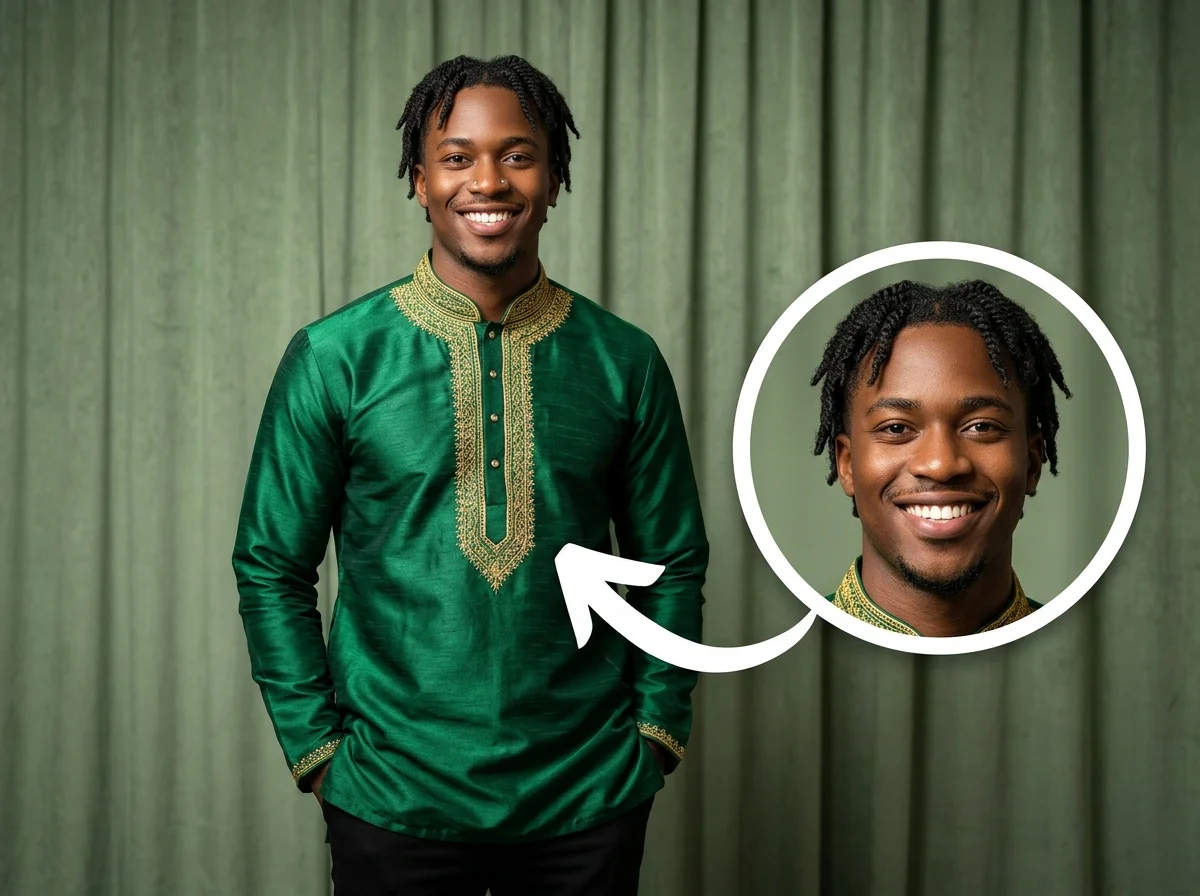
AI Nose Piercing Filter
No effects available
What Is the AI Nose Piercing Filter?
The AI Nose Piercing Filter is a smart image transformation tool that automatically detects your facial structure and seamlessly adds a realistic silver stud nose piercing to your portrait, keeping everything else exactly the same.
Realistic Silver Stud
The AI generates a perfectly placed, photorealistic silver stud that matches the lighting, shadows, and perspective of your original photo, making it indistinguishable from a real piercing.
Preserves Facial Features
Your natural beauty remains untouched. The AI is highly trained to strictly preserve your eyes, skin texture, and unique expressions without any unwanted alterations.
Zero Background Changes
Unlike basic AI filters that might warp your surroundings, this effect isolates the nose area, ensuring the background, clothing, and all other elements remain completely original.
Persona Magic Category
Part of our Persona Magic collection, this fully automated filter lets you safely and instantly experiment with your personal style and body art before making real-life commitments.
Get a Virtual Piercing in 3 Steps
Upload Your Portrait
Upload a clear, front-facing or slightly angled portrait photo. SharkFoto AI automatically detects your face and nose structure.
Apply the Filter
Select the AI Nose Piercing Filter. The AI automatically processes the image and places the stud perfectly—no manual adjustment required.
Download & Share
Within seconds, your new edgy look is ready. Download the high-quality image and share your virtual piercing with friends!
Why Creators Love This Effect
Photorealistic Integration
Matches the ambient lighting, skin tones, and shadows of your original photo for a completely natural look.
Fully Automated AI
No manual adjustment needed. The AI automatically finds the perfect placement for the stud based on your unique facial geometry.
High-Fidelity Retention
Maintains the original resolution and sharpness of your photo, ensuring your face and background stay crystal clear.
Lightning Fast Generation
Powered by advanced cloud AI, the transformation happens in mere seconds, giving you instant results without waiting.
Risk-Free Style Testing
Experiment with body modification virtually. See exactly how a nose piercing looks on you without any pain or commitment.
No Watermark on Download
Download your stunning new portrait without any intrusive watermarks, ready to be used as your new profile picture.
Who Uses the AI Nose Piercing Filter?
From curious individuals to creative pranksters, this effect is perfect for anyone wanting to instantly explore a new aesthetic.
Style Explorers
Thinking about getting a real piercing? Test out the look virtually first to make sure it suits your face shape and personal vibe.
Social Media Enthusiasts
Surprise your followers with a sudden, edgy style change on Instagram or TikTok without actually going to a piercing studio.
Character Designers & Cosplayers
Quickly add subtle body art to character portraits, roleplay photos, or cosplay edits to enhance a specific persona effortlessly.
Pranksters
Send a hyper-realistic photo to your friends or family to see their reaction to your "new" piercing.
Frequently Asked Questions
What kind of photo works best?
For the most realistic results, use a clear, well-lit portrait photo where your face and nose are clearly visible. Both front-facing and slight profile angles work great.
Can I choose a hoop instead of a stud?
Currently, this specific effect is optimized to generate a realistic silver stud. The AI handles the generation automatically to ensure the highest quality and realism.
Will it change my face shape or skin?
No! The AI is strictly designed to preserve your detailed facial features and expressions. Only the nose piercing is added, keeping the rest of the image exactly as it was.
Can I move the piercing manually?
The AI automatically calculates the most anatomically correct and aesthetically pleasing placement for the stud based on your facial geometry, so manual adjustment isn't necessary or supported.
Is it free to use?
Yes, you can try the AI Nose Piercing Filter for free on SharkFoto. Simply sign up for an account to start transforming your portraits instantly.