
- "image": "",
- "output_format": "jpeg"
Nothing to see here... yet!
Ready to make something amazing? Give it a try.
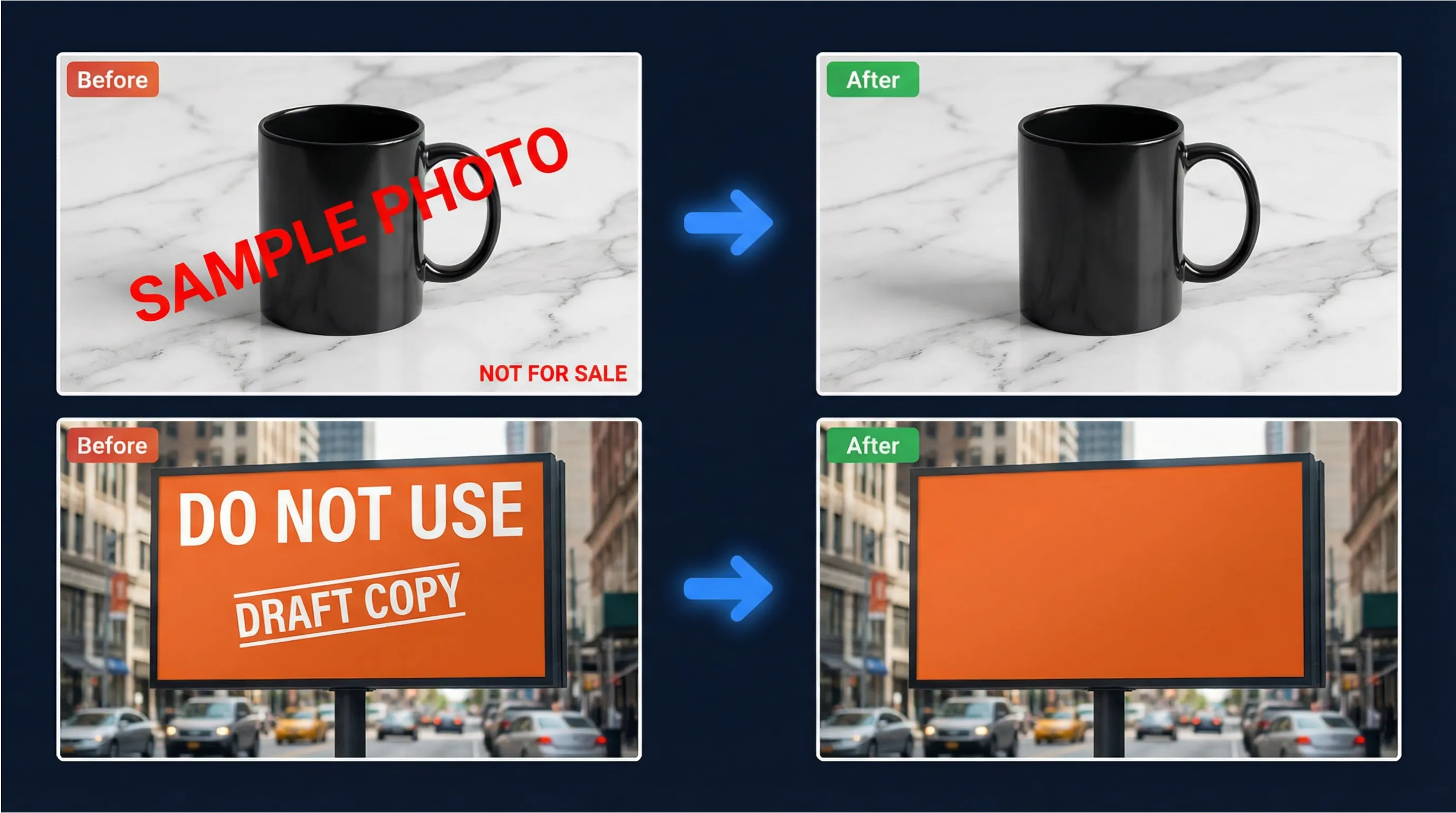
Why Choose SharkFoto Image Text Remover
Professional-grade AI technology that erases unwanted text and reconstructs backgrounds with stunning visual fidelity—no manual editing required.
Intelligent Auto-Detection
Advanced AI automatically identifies all text regions in your image—captions, labels, subtitles, UI overlays, and more—without any manual selection or masking.
Seamless Background Reconstruction
Pixel-level inpainting technology reconstructs textures, lighting, depth, and structure behind removed text—making edits completely invisible to the naked eye.
Lightning Fast Processing
Get clean, text-free images in seconds. Our optimized AI pipeline delivers professional results without the wait—perfect for high-volume workflows and tight deadlines.
All Text Types Supported
Handles captions, subtitles, labels, annotations, UI strings, stickers, overlays, and watermarks across a wide variety of fonts, sizes, colors, and orientations.
High-Resolution Output
Preserves full image quality and resolution throughout the process. Export in JPEG, PNG, or WEBP formats ready for web, print, or professional design pipelines.
Batch Processing Ready
Process multiple images simultaneously with consistent quality. Ideal for e-commerce catalogs, dataset preparation, and large-scale content production workflows.
Comprehensive Text Removal Capabilities
Every feature engineered to deliver clean, professional images with zero visible traces of removed text.
Caption & Subtitle Removal
Clean captions, subtitles, and burned-in text from videos, screenshots, and social media images.
Label & Annotation Cleanup
Remove price tags, product labels, annotations, and informational overlays from product and marketing images.
UI Text & Overlay Erasure
Strip UI strings, interface elements, and embedded app text from screenshots and mockup images.
Watermark Text Removal
Effectively removes text-based watermarks and copyright notices, especially effective on high-contrast text.
Sticker & Stamp Removal
Remove text stickers, stamps, and decorative text elements commonly added to social media photos and stories.
OCR Artifact Cleanup
Clean up stray text fragments, misinterpretations, and OCR artifacts left behind after document scanning or processing.
Use Cases & Applications
Trusted by designers, marketers, e-commerce teams, and content creators to produce clean, professional images at scale.
E-Commerce Product Photos
Strip price tags, stock labels, and sample watermarks from product images before publishing to online stores. Deliver clean, professional visuals that drive conversions.
Marketing & Advertising
Repurpose existing creative assets by removing outdated text, campaign-specific copy, or promotional overlays. Reuse high-quality imagery across multiple campaigns.
Graphic Design & Mockups
Clean billboard mockups, poster templates, and design assets by removing placeholder text. Prepare blank canvases for client presentations and design iterations.
Social Media Content
Remove expired promotional text, outdated hashtags, and platform-specific stickers from images before repurposing them for new social media campaigns.
AI Dataset Preparation
Prepare clean training datasets by removing text annotations, labels, and overlays from large image collections. Improve model accuracy with uncontaminated visual data.
Real Estate Photography
Remove agent watermarks, address overlays, and listing text from property photos. Create clean, versatile images suitable for multiple listing platforms and marketing materials.
How It Works
Remove text from any image in three simple steps—no design skills or technical knowledge required.
Upload Your Image
Upload any image containing unwanted text—product photos, posters, screenshots, social media images, or any other format. Supports JPEG, PNG, and WEBP files.
AI Detects & Removes Text
Our AI engine automatically scans and identifies all text regions in the image. It then erases the text and uses intelligent inpainting to reconstruct the background seamlessly.
Download Clean Image
Preview your text-free image and download it in your preferred format. The result is ready for immediate use in any professional or commercial application.
Technical Specifications
Built on state-of-the-art AI technology for reliable, high-quality text removal at any scale.
Input Formats
JPEG, PNG, WEBP
Supports all common image file formats
Output Formats
JPEG / PNG / WEBP
Flexible output format selection
Processing Speed
Seconds per Image
Fast processing for individual and batch jobs
AI Technology
Deep Inpainting
Advanced neural network background reconstruction
Text Detection
Fully Automatic
No manual selection or masking required
Data Privacy
Auto-Delete
Images deleted immediately after processing
SharkFoto vs. Manual Editing
See why professionals choose SharkFoto AI over traditional manual text removal methods.
Security & Privacy
Your images and data are protected with enterprise-grade security at every step of the process.
Encrypted Transfers
All image uploads and downloads are protected with SSL/TLS encryption, ensuring your files are secure in transit at all times.
Automatic Deletion
Uploaded images are automatically and permanently deleted from our servers immediately after processing is complete. Nothing is retained.
No Data Sharing
Your images are never shared, sold, or used for any purpose beyond providing the text removal service. Your content remains entirely yours.
Secure Infrastructure
Processing runs on secure, isolated cloud infrastructure with strict access controls, regular audits, and enterprise-grade security protocols.
Privacy Compliance
Fully compliant with GDPR, CCPA, and other international data privacy regulations. We are committed to protecting your rights and data at all times.
You Own Your Results
All processed images are entirely yours. Download and use them freely for personal or commercial purposes with no additional licensing requirements.
Frequently Asked Questions
Everything you need to know about AI image text removal with SharkFoto.
What types of text can the AI remove?
SharkFoto AI Text Remover handles a wide range of text types including captions, subtitles, labels, annotations, UI strings, stickers, overlays, and text-based watermarks. It works across different fonts, sizes, colors, and orientations. Best results are achieved with clearly readable text that has reasonable contrast against the background.
How does the background reconstruction work?
After detecting and removing text, our AI uses advanced deep inpainting technology to reconstruct the background. It analyzes the surrounding pixels to understand the texture, color, lighting, and patterns of the original scene, then intelligently fills in the removed area so it blends seamlessly with the rest of the image.
Will the text removal affect image quality?
No. SharkFoto preserves the original image resolution and quality throughout the process. The output image maintains the same dimensions and detail as the input, with only the text regions reconstructed. You can export results in JPEG, PNG, or WEBP formats without quality loss.
What images give the best results?
For optimal results, use the highest resolution version of your image available. Images with flat or simple backgrounds are easiest to reconstruct. Text with good contrast against the background—such as white text on a colored background—yields the cleanest removal. Complex patterned backgrounds may occasionally require minor touch-up.
Can I use this for commercial purposes?
Yes. All images processed with SharkFoto AI Text Remover are yours to use freely for commercial purposes including e-commerce listings, marketing materials, advertising campaigns, and professional publications. No additional licensing fees apply to the output images.
Is there a difference between Text Remover and Watermark Remover?
Yes. The AI Image Text Remover is specifically optimized for detecting and removing text-based content—captions, labels, subtitles, UI strings, and text watermarks. It excels at identifying character shapes and reconstructing the background beneath them. SharkFoto's Watermark Remover handles a broader range of watermarks including logos, graphic overlays, and semi-transparent brand marks.