
- "aspect_ratio": "9:16",
- "images": []
Ocean Dress
Nothing to see here... yet!
Ready to make something amazing? Give it a try.
What Is the Ocean Dress Effect?
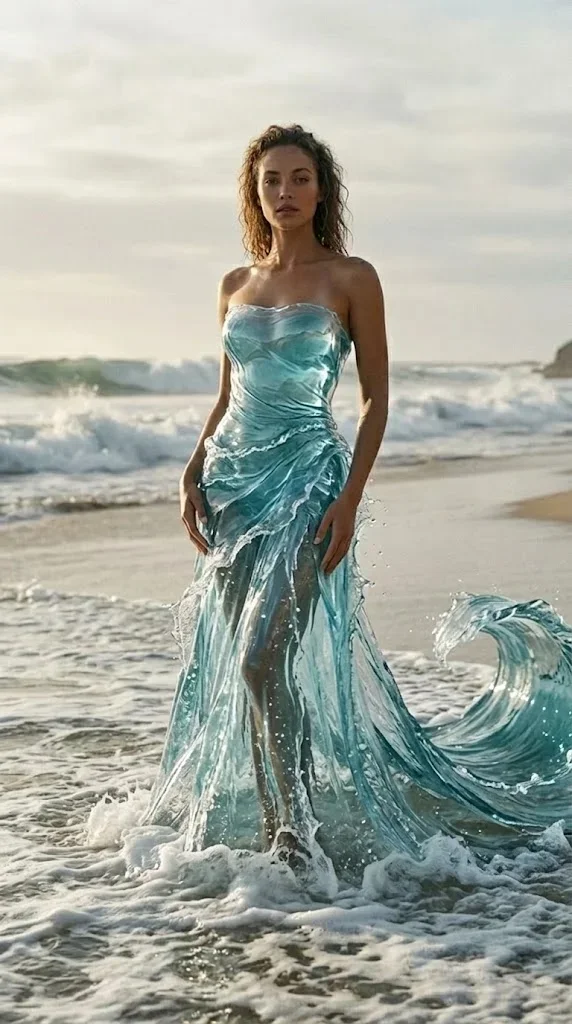
The Ocean Dress Video Effect creates an elegant coastal fashion scene where the subject appears in a completed water-inspired gown. The look blends beach surf, airy daylight, translucent aqua fabric, and graceful forward motion into a polished vertical video.
Ocean-Inspired Gown
The subject is styled in a translucent aqua-blue strapless dress with layered, wave-like fabric. The gown is already complete from the opening frame for a refined fashion-editorial look.
Flowing Fabric Motion
The dress train trails to the side and ripples like water. Soft fabric movement, sea breeze, and shoreline foam work together to create the signature ocean-dress motion.
Coastal Fashion Scene
The scene places the subject at a calm beach shoreline with ocean waves, pale sky, and foamy surf around the hem for a cinematic coastal atmosphere.
Elegant Editorial Mood
A subtle forward walk, soft daylight, and realistic fabric detail create a polished visual style suited for beauty, fashion, and dreamy social posts.
Create Your Ocean Dress Video in 3 Steps
Upload Your Portrait
Upload a clear portrait, half-body photo, or full-body image. SharkFoto AI preserves the subject while preparing the coastal fashion composition.
Select Ocean Dress
Choose the Ocean Dress effect and let the AI create the aqua gown, shoreline setting, foamy surf, and elegant fabric flow around the subject.
Download & Share
Download a vertical video ready for TikTok, Instagram Reels, YouTube Shorts, product teasers, or fashion-inspired social posts.
Why Creators Love This Effect
Photorealistic Fashion Rendering
Realistic daylight, translucent fabric, water foam, and beach atmosphere combine into a premium editorial scene.
9:16 Vertical Video Output
Designed for mobile-first platforms including TikTok, Instagram Reels, YouTube Shorts, and story-format campaigns.
Natural Fabric and Wave Motion
The long aqua train ripples to the side while water moves around the lower hem, giving the clip a graceful ocean rhythm.
Identity-Preserving Styling
The AI keeps the subject recognizable while changing the outfit, environment, and cinematic presentation.
Fast AI Generation
Create a polished ocean-dress video quickly without arranging a shoot, styling wardrobe, or editing fabric motion manually.
Works Best With Portraits
Use a clear person photo so the AI can build a balanced fashion pose and ocean shoreline composition.
Who Uses the Ocean Dress Effect?
Ocean Dress is ideal for creators who want a dreamy, high-end fashion transformation without a studio, beach location, or wardrobe production.
Fashion Creators
Create editorial-style dress reveals, model portfolio clips, and outfit fantasy content for vertical platforms.
Beauty Influencers
Pair makeup, styling, or personal-brand portraits with a soft oceanic fashion atmosphere.
Social Media Creators
Publish scroll-stopping beach fantasy videos with graceful movement and a polished vertical-video hook.
Lifestyle Brands
Build elegant visuals for resort, swim, beauty, jewelry, and seasonal campaign concepts.
Frequently Asked Questions
What type of photo works best?
A clear portrait, half-body photo, or full-body image with one main person works best. Good lighting and an unobstructed face help the AI preserve identity while creating the ocean dress scene.
How long is the generated video?
The Ocean Dress effect is designed as an approximately 5-second vertical clip, ideal for a short social hook, loop, or fashion-style reveal.
Does the effect change my background?
Yes. SharkFoto AI places the subject into a beach shoreline setting with ocean waves, soft daylight, and foamy surf so the dress and environment feel connected.
Do I need video editing skills?
No. Upload your image, select Ocean Dress, and SharkFoto handles the styling, scene generation, animation, and rendering automatically.
Where can I access the Ocean Dress effect?
You can use it directly on SharkFoto.com from the AI Video Effects gallery. No software download or manual editing workflow is required.