
- "aspect_ratio": "16:9",
- "images": []
Flashback Spotlight
Nothing to see here... yet!
Ready to make something amazing? Give it a try.
What Is the Flashback Spotlight Effect?
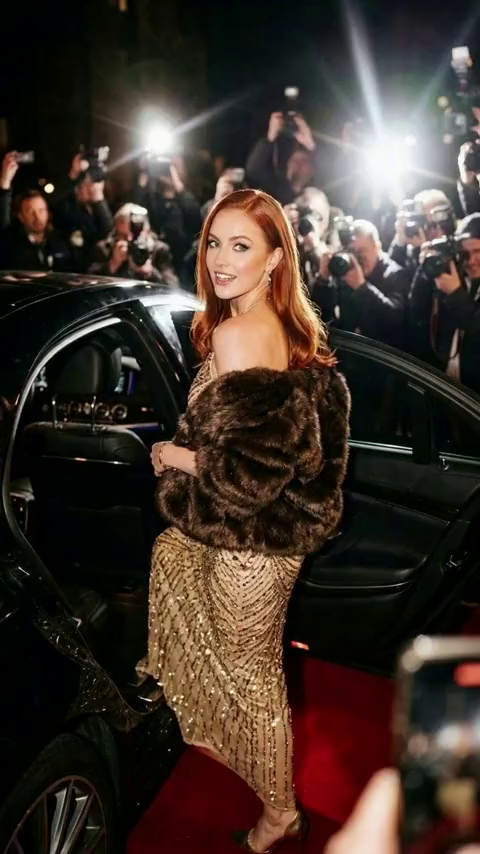
The Flashback Spotlight Video Effect turns a static photo into a dynamic, celebrity-style video. Your subject becomes the center of attention under a barrage of flashing camera lights, complete with an elegant, AI-generated hair-tossing motion.
Paparazzi Flash Effect
A dynamic sequence of bright, flashing spotlights mimics the energetic atmosphere of a red carpet or an exclusive party. The flashes illuminate the subject in a dramatic, cinematic way.
Elegant Hair-Toss Animation
The AI automatically animates the subject with a natural, confident hair-tossing gesture. This subtle yet captivating motion brings the static portrait to life and adds a touch of glamour.
Cinematic Centerpiece
Your subject remains perfectly focused in the spotlight, standing out brilliantly against the dark, flashing background. The AI seamlessly blends the lighting to match the subject's contours.
New Year Special Vibe
Part of our exclusive New Year Special collection, this effect is specifically designed to make your celebratory moments and end-of-year highlights feel like high-profile, star-studded events.
Create Your Spotlight Video in 3 Steps
Upload Your Photo
Upload a portrait or selfie. SharkFoto AI automatically detects your subject and prepares it for the dynamic animation.
Select Flashback Spotlight
Choose the Flashback Spotlight effect. The AI automatically generates the flashing lights and hair-toss motion—no manual settings required.
Download & Share
Your glamorous video is rendered in seconds. Download it watermark-free and share your superstar moment on TikTok, Instagram, or any social platform.
Why Creators Love This Effect
One-Click Glamour
Fully automated AI generation. Just upload your photo and let the AI handle the complex lighting and animation effortlessly.
Natural Motion AI
Smooth, realistic hair-tossing animation that brings static portraits to life with a confident, dynamic flair.
Zero Configuration Needed
No need to tweak timelines or flash intensity. The AI perfectly times the effect for maximum impact entirely on its own.
Dynamic Lighting Physics
Photorealistic flashing spotlights that naturally interact with your subject's face, hair, and clothing.
Fast Generation
SharkFoto's cloud AI pipeline renders your cinematic video in seconds, so you can create, iterate, and post without waiting.
Perfect for Social Media
Download your finished video watermark-free and ready to go viral on Reels, Shorts, and TikTok.
Who Uses the Flashback Spotlight Effect?
From social media influencers to casual party-goers, this effect is built for anyone who wants to make an unforgettable, glamorous impression online.
Social Media Influencers
Create eye-catching, celebrity-style entrance videos that instantly stop the scroll and boost engagement.
Party Goers & Celebrators
Turn your New Year's Eve or birthday outfit photos into glamorous, red-carpet moments to share with friends.
Fashion & Beauty Creators
Showcase stunning makeup looks or hairstyles with dramatic lighting and a chic hair-toss motion.
Brand Marketers
Add a high-end, exclusive VIP feel to promotional content and product modeling shots without a studio budget.
Frequently Asked Questions
What type of photo works best?
Clear portraits or half-body shots work best to capture the hair-toss and facial lighting accurately. Ensure the subject is clearly visible for the AI to apply the animation seamlessly.
Can I adjust the flash speed or the hair-toss motion?
No, the Flashback Spotlight effect is fully automated. The AI automatically calculates and applies the perfect flash frequency and natural hair-toss animation, so you get a flawless cinematic result without needing to worry about any manual settings.
Is this effect good for New Year's Eve posts?
Absolutely! It's part of our New Year Special category, making it perfect for end-of-year recaps, party posts, and celebratory announcements that need a glamorous touch.
Do I need any video editing skills?
None at all. Simply upload your photo, select the Flashback Spotlight effect, and SharkFoto handles everything—lighting generation, hair animation, and rendering—automatically.
Where can I access the Flashback Spotlight effect?
You can access it directly on SharkFoto.com in the Video Effects gallery. Sign up for a free account to get started instantly.