
- "aspect_ratio": "16:9",
- "image_input": [],
- "output_format": "jpeg"
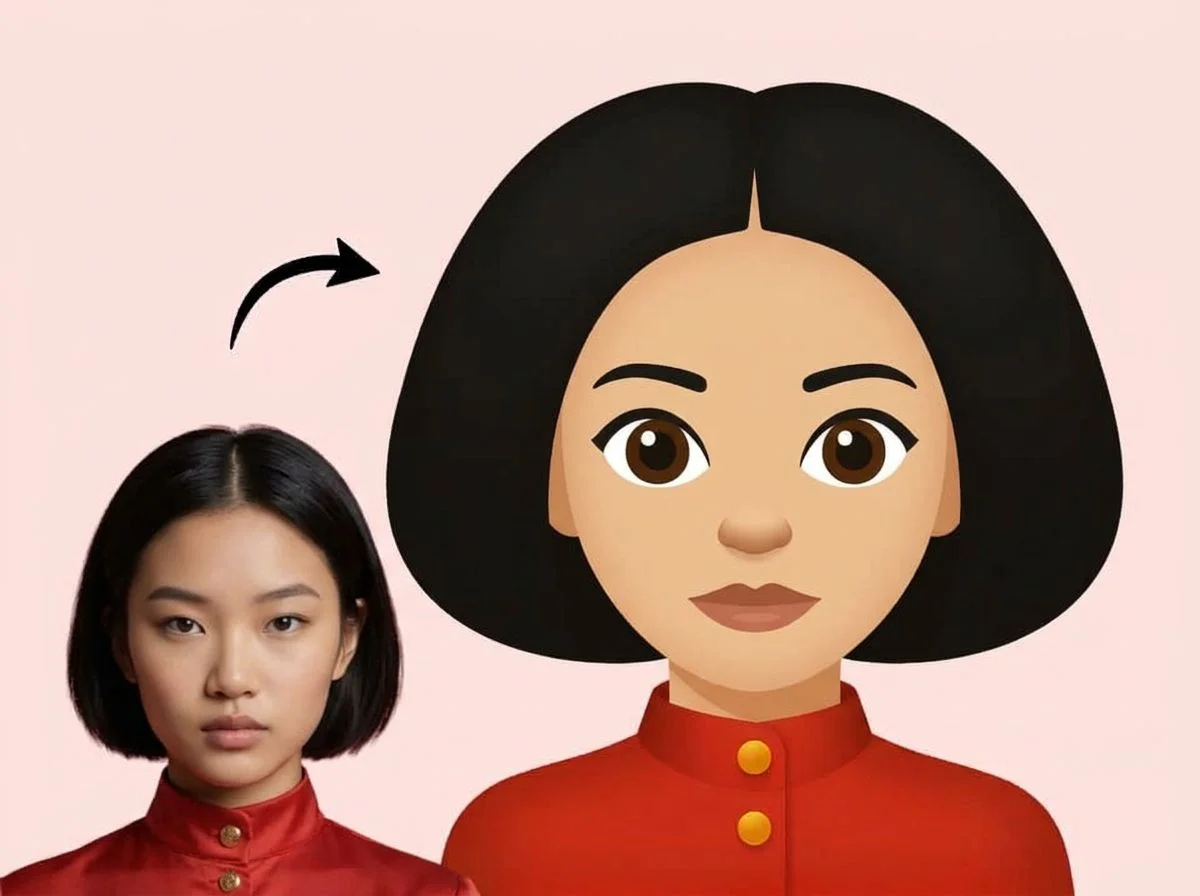
Create Emoji from Photo
Nothing to see here... yet!
Ready to make something amazing? Give it a try.
What Is the Create Emoji Effect?
The "Create Emoji from Photo" effect is a Style Shift AI tool that automatically converts your standard photographs into vibrant, stylized digital emojis. It analyzes the subject's unique facial features to generate a personalized avatar that looks just like them.
Personalized Characteristics
The AI goes beyond generic filters. It identifies distinct features like hairstyles, glasses, and facial structures to ensure the resulting emoji is highly recognizable and uniquely yours.
Vibrant Style Shift
The output features the clean, colorful, and slightly exaggerated aesthetic typical of modern 3D and 2D emojis, perfectly bridging the gap between photorealism and stylized digital art.
Fully Automated Process
No manual editing, tracing, or design skills required. The AI handles 100% of the transformation instantly. Just upload your photo and let the system do the magic.
Perfect for Avatars
The resulting square-format images are perfectly framed and optimized to be used as profile pictures across all your favorite social media and messaging platforms.
Create Your Custom Emoji in 3 Steps
Upload Your Photo
Upload a clear portrait or selfie. For the best results, use a photo with good lighting where the subject's face is clearly visible.
Apply the Effect
Select the "Create Emoji from Photo" effect. Our AI instantly takes over, analyzing the image and generating the emoji automatically—no settings to tweak.
Download & Share
Within seconds, your custom emoji is ready. Download the high-quality image and use it as your profile picture, in chats, or on social media.
Why Creators Love This Effect
Instant Generation
Get your custom emoji in mere seconds thanks to our lightning-fast AI image processing pipeline.
Zero Editing Required
A true one-click solution. The AI does 100% of the work, meaning no sliders, brushes, or manual adjustments are needed.
Distinct Feature Recognition
Accurately captures unique facial traits, expressions, and accessories so the resulting emoji feels personal.
High-Quality Output
Generates clean, crisp, high-resolution images perfect for use as avatars across various digital platforms.
No Watermark on Download
Download your personalized emoji completely watermark-free and ready to publish or share immediately.
Fun & Engaging
A highly shareable format that adds a playful, modern touch to your digital presence and daily conversations.
Where to Use Your Custom Emoji
Upgrade your digital identity. Here are just a few ways people are using their AI-generated emojis.
Social Media Avatars
Stand out on Instagram, X, TikTok, or Discord with a unique, stylized profile picture instead of a standard photo.
Messaging & Chats
Use your custom emoji as a fun reaction image or profile icon in WhatsApp, iMessage, Telegram, or Slack.
Gaming Profiles
Perfect for creating fun, anonymous-yet-personal avatars for gaming networks, Twitch, and community forums.
Fun Gifts for Friends
Surprise your friends or family by turning their favorite photos into hilarious and cute personalized emojis.
Frequently Asked Questions
What kind of photo works best?
Clear, well-lit portraits or selfies where the subject is facing the camera work best. The AI needs to clearly see facial features, hair, and expressions to replicate them accurately in the emoji style.
Can I customize the emoji's expression or colors?
No, this effect is designed to be fully automated for the fastest and easiest experience. The AI analyzes the original photo and automatically determines the best emoji representation based on the subject's actual expression and features.
How long does it take to generate?
The transformation happens almost instantly. Once you upload your photo and apply the effect, your new emoji is usually ready to download in just a few seconds.
Is the output image free to use?
Yes! Once generated, you can download and use your custom emoji anywhere you like, from public social media profiles to private group chats.
Do I need to install any apps?
Not at all. The entire process runs directly in your web browser on SharkFoto.com. There is no software to download or install.