
- "aspect_ratio": "4:3",
- "image_input": [],
- "output_format": "jpeg"
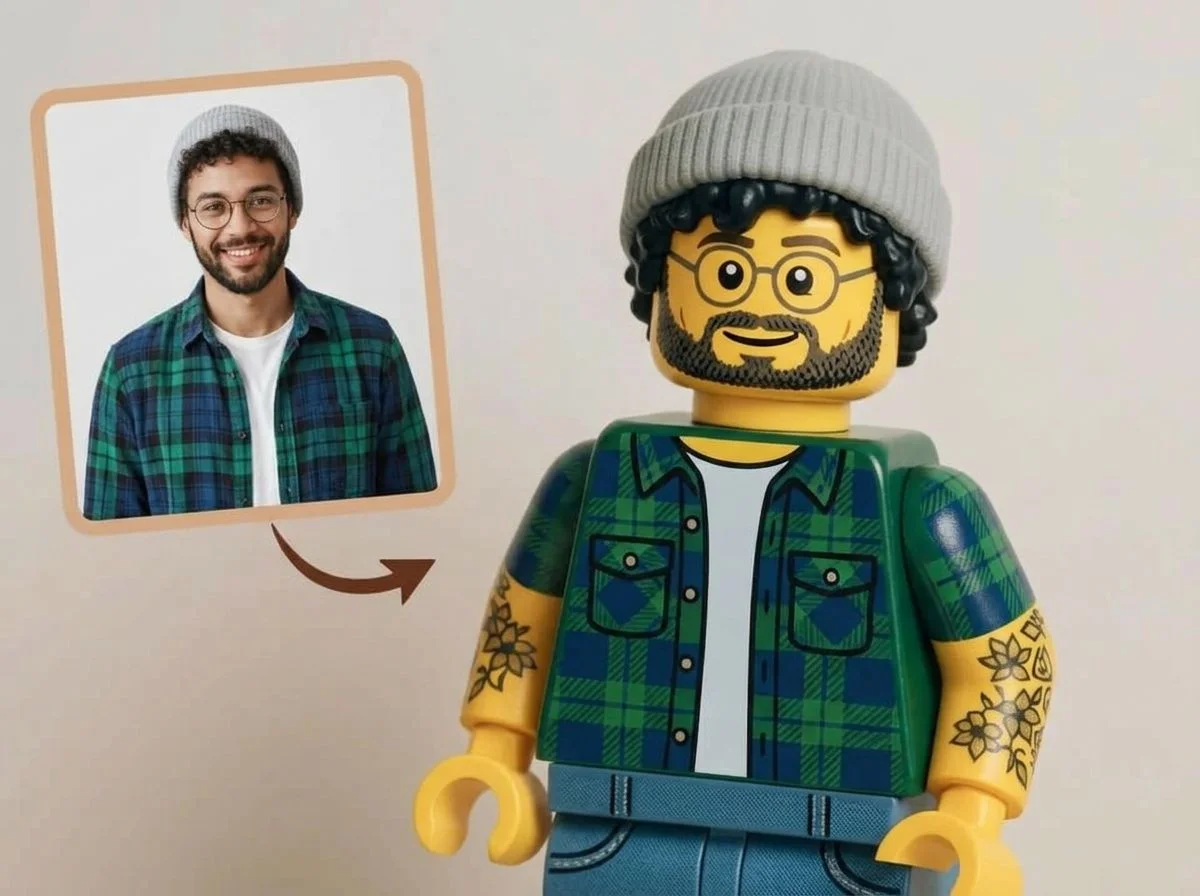
AI Lego Filter
Nothing to see here... yet!
Ready to make something amazing? Give it a try.
What Is the AI Lego Filter?
The AI Lego Filter magically reconstructs your uploaded photo using digital toy bricks. It perfectly preserves your original scene, giving you a 100% consistent image reimagined in a classic, nostalgic block aesthetic.
Perfect Scene Consistency
Your original background, characters, and overall status remain exactly the same. The AI intelligently maps the composition, ensuring the final image is a direct 1-to-1 translation of your photo.
Iconic Brick Aesthetic
Experience the nostalgic look of classic interlocking plastic bricks. Textures, studs, and vibrant colors are seamlessly applied to mimic the appearance of a real-life physical toy build.
Minifigure Transformation
People in your photos are transformed into charming, blocky minifigure-style characters while retaining their original clothing colors, poses, and overall vibe perfectly.
Fully Automated Magic
No complex prompting or 3D modeling required. The AI handles the entire transformation automatically, delivering a high-quality stylized image instantly without any manual tweaking.
Create Your Lego World in 3 Steps
Upload Your Photo
Upload any portrait, landscape, or group photo. SharkFoto AI instantly analyzes the subjects, poses, and background details.
Apply the Filter
Choose the AI Lego Filter from the Style Shift gallery. The AI automatically does all the heavy lifting—no settings or manual tweaks required.
Download & Share
Your brick-ified masterpiece is generated in seconds. Download your high-resolution image and share your new toy-inspired world!
Why Creators Love This Effect
100% Scene Preservation
Keeps your original poses, facial expressions, and backgrounds fully intact while applying the stylized brick texture.
Zero Configuration Needed
Fully automated AI generation. Just upload your photo and get perfect results without adjusting any complicated parameters.
High-Resolution Output
Generates crisp, detailed images where you can almost feel the plastic texture and studs of every individual digital brick.
No Watermark on Download
Download your finished image watermark-free and ready to publish across all your social platforms instantly.
Works on Any Subject
Whether it's a selfie, a pet, a car, or a landscape, the AI perfectly adapts the blocky style to any type of photo.
Lightning Fast Generation
SharkFoto's cloud AI pipeline renders your stylized image in seconds, saving you hours of manual digital painting or 3D modeling.
Who Uses the AI Lego Filter?
From parents and kids to social media creators, the AI Lego Filter is perfect for anyone looking to add a touch of playful nostalgia to their photos.
Social Media Enthusiasts
Create eye-catching, unique profile pictures or viral posts that stand out in crowded feeds.
Parents & Kids
Turn family portraits or photos of your children into fun, imaginative toy-world posters they will love.
Gamers & Geeks
Celebrate your love for building blocks by transforming your gaming setup, cosplay, or room into a brick masterpiece.
Creative Marketers
Use playful, toy-styled imagery for ad campaigns, newsletters, or brand posts to evoke nostalgia and joy.
Frequently Asked Questions
What type of photo works best?
Any clear photo works great! Whether it's a close-up portrait, a group shot, or a scenic landscape, the AI accurately maps the original composition and transforms it into bricks.
Can I change the colors or modify the Lego style?
No, the AI is designed to be fully automatic for the best results. It strictly follows the colors, lighting, and layout of your original photo to ensure a 100% consistent transformation without needing manual tweaks.
How long does it take to generate?
The transformation happens in just a few seconds. Our high-speed AI processes your image almost instantly, letting you download your new masterpiece right away.
Do I need to write prompts to get this effect?
Not at all. The AI Lego Filter is a one-click style shift. You don't need to write any text prompts or have any technical skills—just upload and let the AI do the rest.
Can I use these images commercially?
Yes. Images generated on SharkFoto are yours to use commercially, including for marketing, merchandise, and social media. Please review the SharkFoto Terms of Use for full details.