
- "aspect_ratio": "16:9",
- "image_input": [],
- "output_format": "jpeg"
AI Balloonify Effect Generator
Nothing to see here... yet!
Ready to make something amazing? Give it a try.
What Is the AI Balloonify Effect?
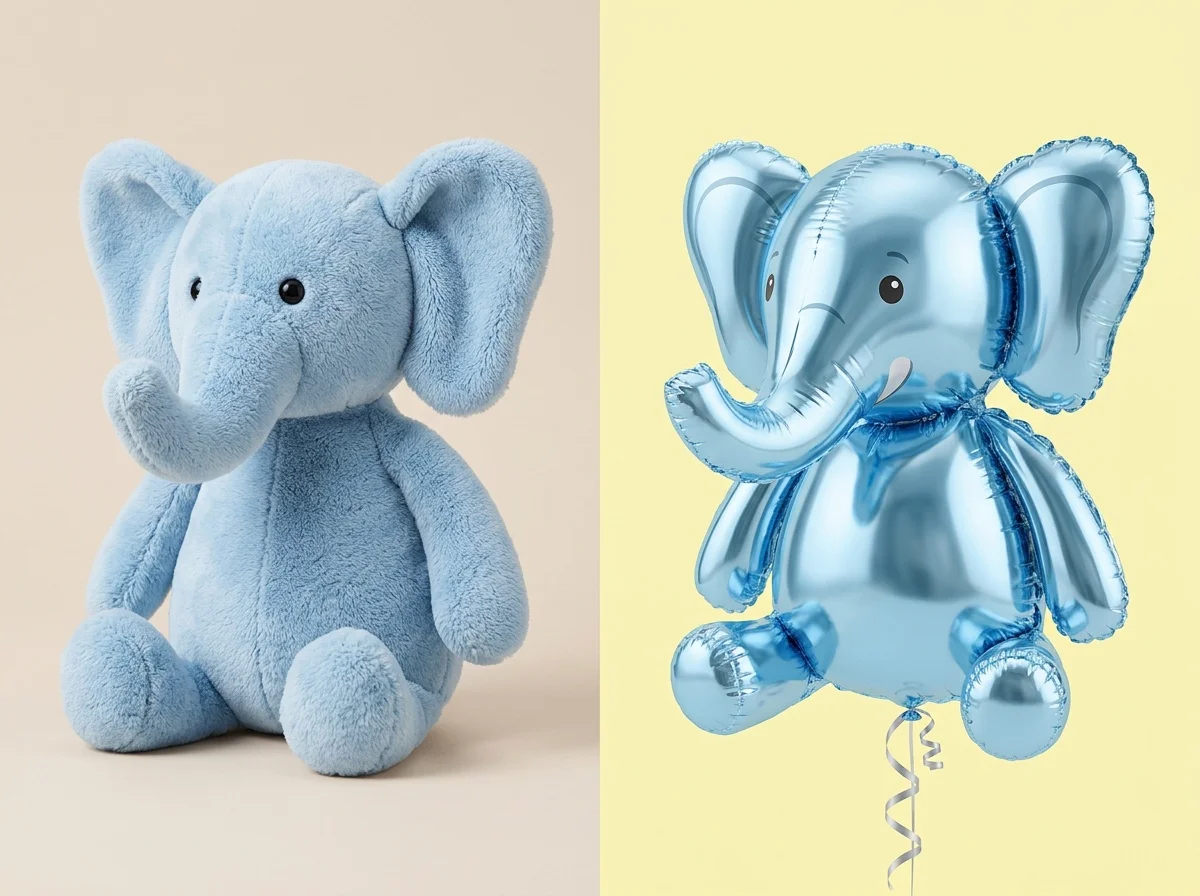
The AI Balloonify Effect Generator is a playful Style Shift tool that automatically detects the main subject in your photo and turns it into a glossy, doll-style helium balloon, making it appear to float effortlessly within your original background.
Doll-Style Balloon Texture
The AI applies a highly realistic, glossy, and inflated texture to your subject, accurately mimicking the look, reflections, and volume of a classic foil or latex helium balloon.
Floating Illusion
Your subject is intelligently processed to look like it has lost its gravity and is naturally floating in the air, adding a surreal and whimsical touch to your image.
Background Preservation
The effect focuses entirely on the subject. Your original background is perfectly preserved without any unwanted alterations, distortions, or replacement.
Zero Manual Adjustment
Everything is fully automated. The AI handles subject detection, texturing, and compositing instantly—no custom settings, manual masking, or output definitions are allowed or required.
Create Your Balloon Image in 3 Steps
Upload Your Photo
Upload any image with a clear subject. SharkFoto AI automatically scans the photo and seamlessly isolates the main figure from the background.
Apply the Effect
Select the AI Balloonify Effect. The AI takes complete control, instantly applying the balloon transformation and floating effect without any manual tweaking.
Download & Share
Your creative image is rendered in seconds. Download your high-resolution, watermark-free photo and share the fun with everyone.
Why Creators Love This Effect
Photorealistic Glossy Textures
Delivers stunningly realistic reflections and inflated shapes that make the subject look like a genuine helium balloon.
Flawless Subject Isolation
Advanced AI perfectly separates your subject from the background, ensuring clean edges and a seamless transformation.
Fast Image Generation
SharkFoto's cloud AI pipeline processes and renders your balloonified image in just a matter of seconds.
Fully Automated AI Process
No complex parameters to set. The AI dictates the output, ensuring optimal results every time with zero manual effort.
Works on Diverse Subjects
Whether it's a portrait, a pet, or an everyday object, the AI adapts the balloon effect to fit the shape naturally.
No Watermark on Download
Download your finished image watermark-free and ready to share, print, or publish anywhere.
Who Uses the AI Balloonify Effect?
From digital artists to casual users looking for a laugh, the AI Balloonify effect is perfect for adding a touch of whimsy to any photo.
Social Media Creators
Stand out on Instagram and Twitter with surreal, eye-catching images that stop the scroll and spark conversations.
Digital Artists
Incorporate playful, pop-art elements into your creative projects without spending hours on 3D modeling or texturing.
Event & Card Designers
Design highly personalized and unique birthday cards, party invitations, or celebration graphics.
Casual Users
Have fun transforming your friends, family members, or pets into floating balloons for a good laugh in group chats.
Frequently Asked Questions
What type of photo works best?
Photos with a clear, well-lit subject against any background work best. The AI is highly effective at identifying people, pets, and distinct objects to apply the balloon effect.
Can I adjust how the balloon looks?
No, the process is fully automated to guarantee the best results. The AI analyzes the subject and applies the optimal doll-style helium balloon texture and floating effect automatically.
Will my background change?
Not at all. The AI Balloonify Effect is specifically designed to leave your original background exactly as it is, only altering the main subject.
Do I need to manually mask the subject?
There is no need for manual masking. Simply upload your photo, and SharkFoto handles the subject detection and compositing entirely on its own.
Can I use the generated images commercially?
Yes. All images generated on SharkFoto are yours to use commercially, including for marketing campaigns and creative projects. Please review the SharkFoto Terms of Use for full details.